
Xert is an end-to-end smart training platform for cyclists (and other power-based sports like running and rowing). It helps you plan, execute, and review your training, automatically tracking your progress over time.
What makes Xert different: instead of tracking fitness as a single number, Xert models your training & performance across three energy systems — Low, High, & Peak — so your training targets and recommendations match the real demands of riding, racing, and climbing.
Quick Start — 10 minutes or less
- Create & Register your account
- Complete the Profile Wizard:
- Enter Age, Gender, & Weight
- Connect your devices/apps (Strava, Garmin, Zwift, Wahoo, etc.)
- Import your recent history or answer some questions to get your profile properly set up
- Verify your Fitness Signature (TP, HIE, PP) is reasonable — contact support if you're unsure
- Choose how you wish to train:
- Xert Adaptive Training Advisor (XATA) — daily adaptive training recommendations or
- Forecast AI (XFAI) — allow Xert to create a plan to help you achieve a particular fitness level or preparedness for a race or event
- Review your training recommendations & complete your first training
Related: If you want the fastest onboarding, follow: Xert in 10 Minutes: The Essentials
1. Set Up Your Account
Create and activate your account
Create your account, & complete the registration via the email sent to you.
Note: Your 30 day free trial begins once your account is registered.
Connect your devices and apps
Connect the platforms you actually use for training (Garmin, Zwift, Wahoo, Hammerhead, Strava, etc.). We strongly recommend connecting to Strava so Xert can import your activity history to establish a fitness baseline. Xert is also compatible with other apps that aren't shown in the initial registration page, including MyWhooh, Hammerhead, Rouvy, & more!
Related guide: Integrations Overview & Data Flow
Import your training history
In the final step of the Profile Creation Wizard, you can import your activity history. This helps Xert establish your starting fitness & your overall training volume. During the free 30 day trial, Xert allows you to sync your last 3 months of rides to create your baseline. Alternatively you can bulk import .fit files into Xert from your last 3 months of training.
Note: If you choose to subscribe to Xert Premium later, you can sync back further from Strava.
If you don't use Strava or don't have any .fit files to upload, you'll be asked to answer some questions regarding your fitness, including your estimated FTP, max power, & weekly training volume. These are used to help establish some baseline. As you upload more data & hard efforts to Xert, the system will continue to learn more about your fitness.
Related article: Sync Historical Activities from Strava to Xert
2. Understand Your Fitness with Xert
Fitness Signature
Instead of simply tracking FTP, Xert tracks your fitness across multiple dimensions of fitness, including:
- Threshold Power (TP) - your maximum sustainable power, like FTP
- High Intensity Energy (HIE) - your ability to push hard & sustain efforts above your FTP
- Peak Power (PP) - your maximum sprint power
Related guide: Fitness Signature
Related glossary: Threshold Power (TP) • High Intensity Energy (HIE) • Peak Power (PP)
Xert determines these 3 values from your ride data — specifically from rides that push you to your limits. Since we can do this with your real ride data, you don't need to perform "fitness tests" with Xert if you don't want to!
However, if your last 3 months of data doesn't include maximal sprints or hard efforts - or if you've only done structured workouts in ERG mode, it's very possible for your fitness signature to be a bit underestimated at first until you "prove" your fitness.
Quick tip to improve signature accuracy: Do a few short all-out sprints (5–10s) plus one longer hard effort (8–12 min) on a day you feel good to help Xert establish an accurate baseline.
Training Load & Training Status
Your fitness signature tells us how much power you're able to produce, while training load tells us how much training you do. It's based on a running average of your daily activity. The more you ride, the higher your training load is, the more stars you'll have in your Xert profile, & the more durable of a rider you become.
Training Status helps you understand what kind of training you can handle today (fresh vs tired), based on your recent training. At a very basic level:
- Blue/Green means all systems are ready to go & high-intensity training is okay
- Yellow means your high intensity systems need rest, but your low intensity system is still okay to train. Endurance training is okay!
- Red means that even your low intensity system needs rest. Only light active recovery or rest is recommended.
Related glossary: Training Status (Form) • Training Load (TL)
3. Choose Your Training Program
Option A: Xert Adaptive Training Advisor (XATA)
XATA gives day-by-day recommendations based on your training status & needs, based on your settings & goals. There are 3 programs offered with XATA: Base-Build-Peak, Continuous Improvement, & Challenge.
Because recommendations dynamically adapt to what you actually did yesterday, XATA does not schedule workouts into your planner weeks ahead of time. You can preview recommendations for coming days by heading to the planner & clicking the + button to schedule your training.
Use XATA if you desire flexibility and you want Xert to answer: “What should I do today to keep progressing?”
Related guide: Training with Xert Adaptive Training Advisor (XATA)
Option B: Xert Forecast AI (XFAI)
Forecast AI builds an outcome-driven plan & can be used to plan to achieve a Goal, Event, or Race. It schedules future training targets in your Fitness Planner so you can see what’s coming ahead.
Use XFAI when you want a forward-looking plan in your planner that answers: “What training will I need over the coming weeks to reach my specific goal?”
Related guide: Training with Xert Forecast AI (XFAI)
Not sure which to choose?
XATA Continuous Improvement with a Rouleur/6 min power focus is the default training program, which is a great choice for all-around fitness. We recommend sticking with XATA if you’re unsure. Move to Forecast AI when you have a specific goal date or want a visible plan.
Related guide: Choosing the Right Training Plan: XATA vs Forecast AI (XFAI)
4. Do Your First Training Session
The Today page is your daily training home base. It shows what Xert recommends for today, what you have planned, and what you’ve completed—so you always know what to do next.
What Xert recommends each day
Instead of locking you into a single scheduled workout, Xert recommends daily Low / High / Peak XSS targets. These targets represent how much Strain you need to put on your Low, High, & Peak systems, which can be achieved in a variety of different ways.
The best part: you can hit those targets in whatever way fits your schedule and motivation—a structured workout, a free ride, a group ride, or a race.
How Recommended Training is ranked
Xert’s Recommended Training list is ordered by fit. Workouts and activities rise to the top when their Low/High/Peak XSS breakdown best matches your current Daily/Remaining targets. In other words, the first options in the list are the ones most likely to help you meet today’s targets efficiently.
Three ways to complete today’s training:
Option A: Do a structured workout — most straightforward
If you want a clear start-to-finish session, choose a structured workout.
- Use the Workout Players section on the Today page to send a workout to your preferred app/device.
- For the full SMART workout experience (fatigue-aware targets, dynamic intervals), we recommend using the Xert EBC app.
Related guide: Sending Workouts with Xert
Option B: Do a free ride — outdoors or virtual
Prefer riding without a strict script? That works great in Xert! Under the Choose Training section of the today page, Xert will suggest ride options that match today’s targets—including past rides you’ve done before. You can:
- replicate one of the past recommended routes/rides, or
- simply ride freely while keeping today’s targets in mind
This is a great approach for endurance days, commutes, or “ride with friends” days.
Option C: Use Magic Buckets — most flexible
Magic Buckets turns any ride into a guided training session in real time. It continuously adjusts based on what you’ve already accumulated and what you still need for the day—so you can combine unstructured riding (group rides, Zwift races, outdoor riding) with real training precision.
Related guide: Magic Buckets Overview
How scheduled workouts work
If you have a workout scheduled — including automatically scheduled Workout of the Day (WOTD) — Xert will automatically send it to your connected workout players at midnight each day. If you change your mind, you can always select a different workout from the Today page and resend it.
5. Reviewing your Activities
After a completed activity syncs, open it in Xert. You'll have access to all plenty of activity metrics in the activity data table: Distance, Duration, XSS, Difficulty Score, as well as Focus, & Specificity.
Many riders look at best power efforts over different durations to understand performance. While you can find a power curve for your activity via the Power Duration tab, Xert's analysis is far more advanced.
Another common traditional analysis might be looking at time in zones. Xert doesn't use time-in-zones, but rather treats your performance as a continuous spectrum. The closest comparison would be Focus & Specificity, which looks at how you placed strain across your 3 energy systems throughout your ride.
Glossary: Focus Duration • Specificity
The key feature of Xert's activity analysis is the MPA chart, which shows your Power, MPA, & Difficulty Score throughout the ride. You can also click the Chart legend to show additional information like Heart Rate, Cadence, Altitude, & more.
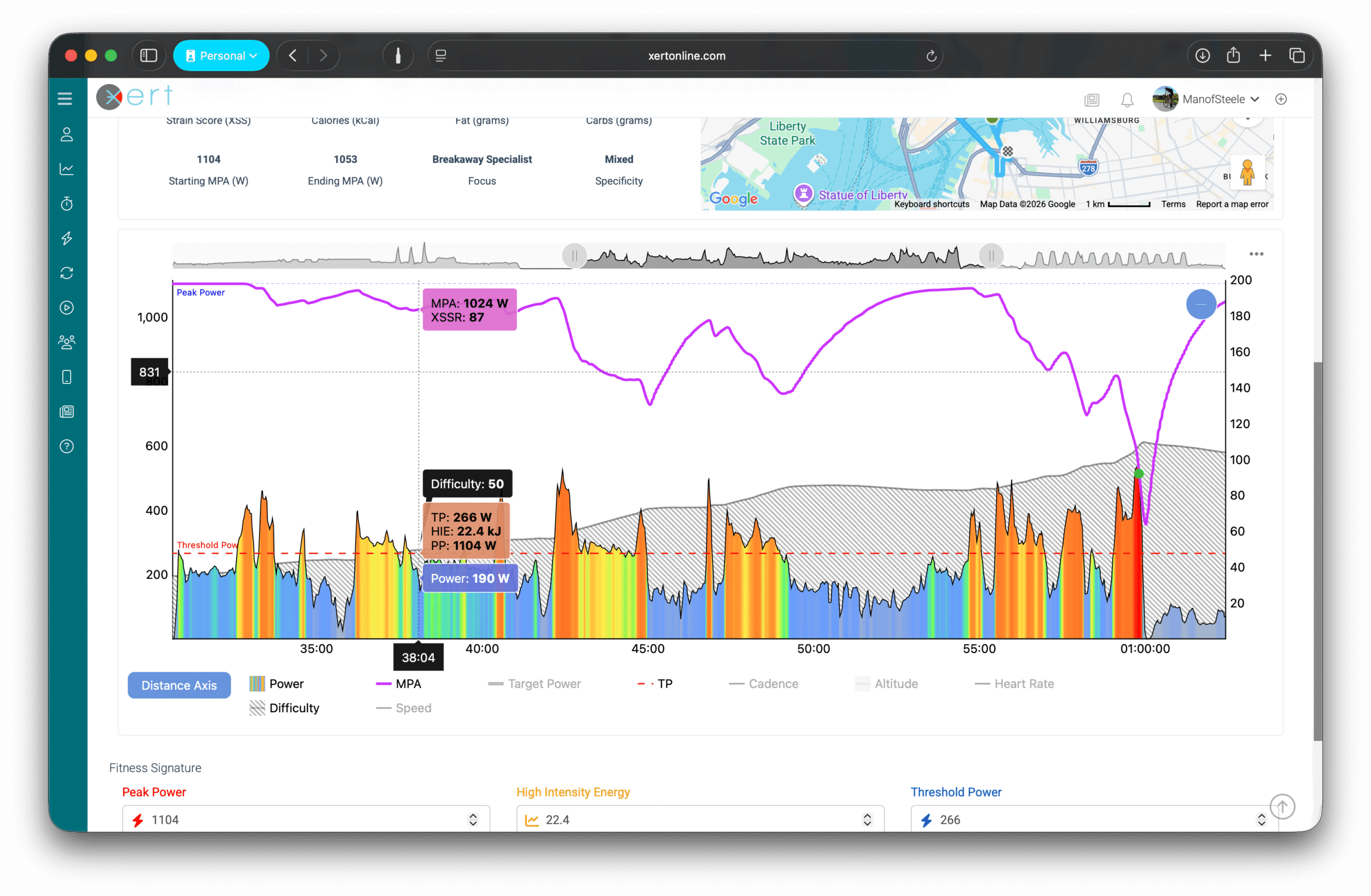
Breakthroughs are detected from real performance - often in races, group rides, hard climbs, or max effort intervals to failure. You'll see Breakthrough performances as moments where your MPA (shown in Magenta) touches your actual power output (shown as the multi-coloured line below).
Guide: How to Analyze an Activity Using MPA
Glossary: Breakthrough & Near-Breakthrough
6) Track Your Progress Over Time
Improving your fitness comes from progressive overload — gradually applying more strain than your body is already used to.
Xert helps you achieve progressive overload across all three systems (Low/High/Peak), depending on the type of rider you're training to be. For example, athletes training to improve their sprint performance will train differently than athletes who are looking to improve their steady climbing power.
You can track your long-term progress from the:
- Xert Performance Management Chart (XPMC)
- Fitness Planner — especially for Forecast AI plans, where training compliance is colour-coded
Related glossary: Xert Performance Management Chart (XPMC)
Common Onboarding Questions (FAQ)
Why is my XATA calendar blank?
That’s normal. XATA provides daily adaptive recommendations, not a fixed schedule. You pick today’s training based on Today page recommendations.
Why doesn’t Forecast AI change tomorrow’s workout if I did something hard today?
Forecast AI builds a plan; if you deviate, you should Adapt Forecast to re-optimize the plan based on what you actually did.
Related glossary: Adapt Forecast
Do I need to adjust Freshness Feedback every day?
No. Most athletes leave it alone most days. Use it when your body feels different than your Training Status suggests (poor sleep, stress, illness, travel).
Related glossary: Freshness Feedback
I want to get faster at 20–30 minute climbs - what should I choose?
A common approach is to use Forecast AI Goal targeting longer sustained power (e.g., 20 min) or select an Athlete Type that matches your target efforts.
Related glossary: Athlete Type
Do I need to do an FTP test?
No. Xert learns from your real rides. If your data lacks maximal efforts, do a few hard efforts to help anchor your signature.
Related guide: How to Verify Your Fitness Signature — and what to do if it seems wrong
I don’t have a power meter on every bike - can I still use Xert?
You do need at least one power source (power meter or smart trainer). However, you don't need a power meter for every ride/activity. Enable HRDM (Heart Rate Derived Metrics) so Xert can estimate training metrics from heart rate (and cadence, if available).
Related glossary: Heart Rate Derived Metrics (HRDM)
Where do I see my Heart Rate and Power Zones?
Xert doesn’t focus on traditional “time in zones” charts as the core of training. Instead, Xert models your training using strain and fatigue (XSS + MPA) and tracks how that strain is distributed across your Low / High / Peak energy systems. This approach is more specific to real-world riding and better aligned with how fitness actually changes.
Related article: If you’re coming from zone-based training and want the deeper explanation, see: From Zones to Focus and Strain
Need Help?
- Browse the Xert Help Center — the search works great!
- Ask the Xert community for help in the Xert Online Forum
- Contact support team: support at xertonline.com
Comments
0 comments
Please sign in to leave a comment.