
Effortless sync and richer training insights on Strava.
Best for: Athletes who want Strava as their activity hub, want to import historical rides into Xert, and/or want Xert’s training summaries and reports added to Strava activities.
In this guide: How to connect, sync activities both directions, best-practice data flow, and FAQs.
Overview
Strava is one of the most widely used activity platforms for cyclists and runners. Connecting Strava to Xert lets you:
- Import activities into Xert for analysis and training progression
- Send Xert-processed activities to Strava
- Add training summaries and visual reports to Strava descriptions (optional)
Many platforms are great for syncing new activities. Strava is especially valuable because it also makes it easy to sync historical activities—perfect when you’re starting a trial, onboarding a new account, or rebuilding your training history in Xert.
Connecting Strava to Xert
- Log in to Xert at www.XertOnline.com
- Go to Sync → Strava
- Click Connect to Strava, enter your Strava credentials, and authorize permissions
- Once authorized, enable the options you want:
- Sync New Strava Activities to Xert — automatically imports Strava activities to Xert
- Sync new Xert activities to Strava — automatically syncs Xert activities to Strava
- Show Reports and Summary Data on Strava — adds training reports & text summaries on rides synced to Strava (optional)
How to confirm it’s working
- Sync a new activity to Strava and check that it appears in Xert (if Strava→Xert enabled)
- Complete a workout or sync a new ride in Xert and confirm it appears in Strava (if Xert→Strava enabled)
Import Activities from Strava to Xert
Automatic import for new activities
If Sync new Strava activities to Xert is enabled, new Strava activities will import automatically.
If you already sync activities directly from another primary source (e.g., Garmin or Zwift), you may want to disable this setting to reduce the chance of duplicates.
Manually import for older or missing activities
To import older rides, or anything that didn't sync automatically:
- Go to Sync → Strava
- Find the activity in the list of unsynced Strava activities
- Use the checkbox to select one or more activities
- Click Sync to import them into Xert
✅ This is the recommended way to bring your historical training into Xert when you’re just getting started.
Related guide: Syncing older Strava activities
Pushing activities from Xert to Strava
You can have Xert automatically forward activities to Strava. To enable this, go to Sync → Strava and turn on Sync New Xert Activities to Strava.
If you prefer to review activities first (e.g., hide duplicates, choose a Master file, or merge rides), we recommend leaving this off and sending activities to Strava manually from the Today page once everything looks the way you want.
Training Summaries & Reports
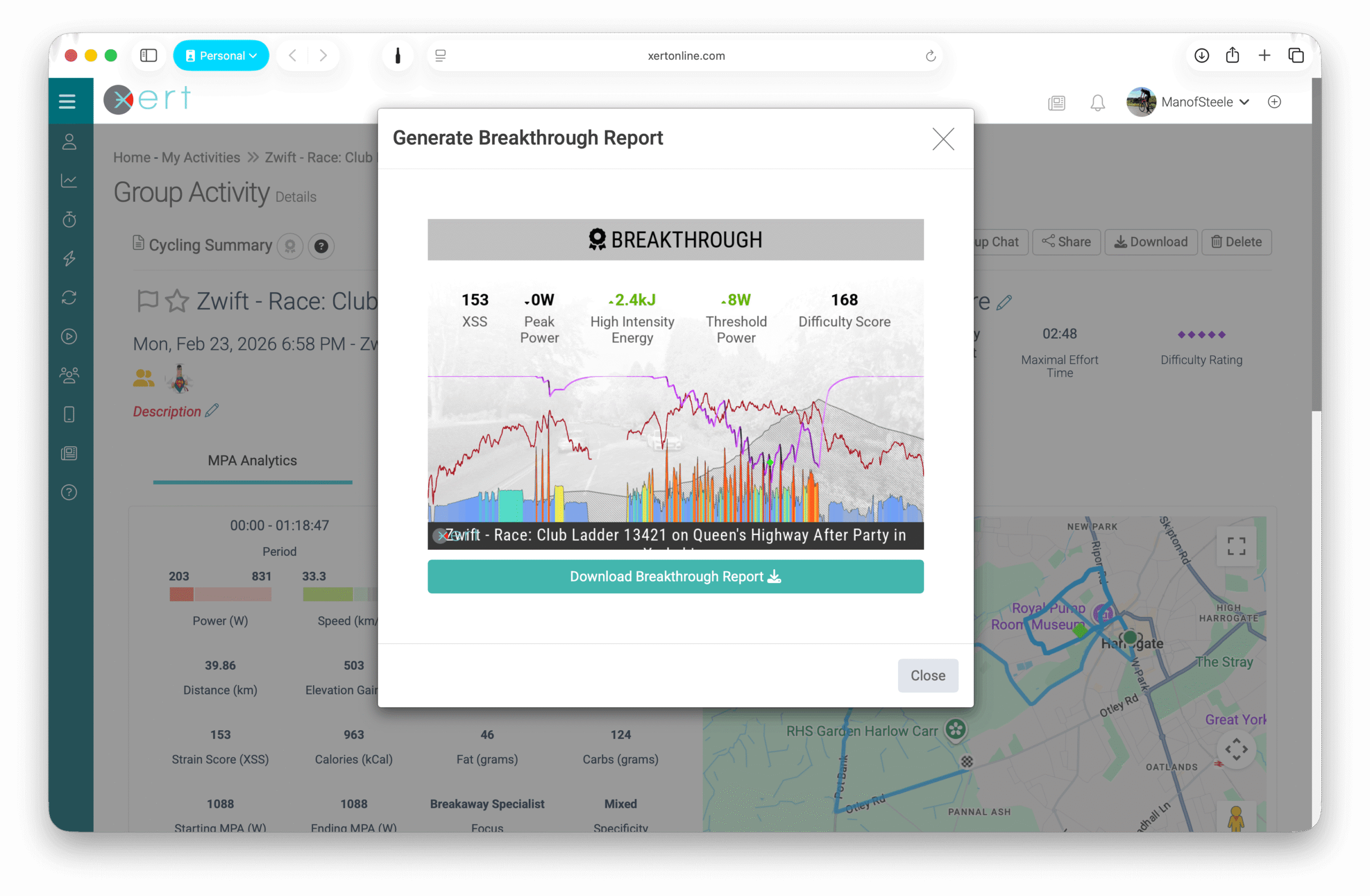
When Show Reports and Summary Data on Strava is enabled, Xert adds:
- A training summary (e.g., XSS, Difficulty, estimated Fat & Carb usage)
- Visual reports are included for:
- Breakthroughs & Near-Breakthroughs
- Workouts completed using the Xert EBC app
- Forecast AI reports (when using XFAI programs)
- Xert Group Sessions
Related guide: How to get training reports and text summaries added to Strava
Ride Titles and Naming
Xert applies an automatic naming format (e.g., “Moderate Mixed Climber Ride”) which is based on the rides' Difficulty, Specificity, & Focus. Rides synced from Zwift & Rouvy will retain their activity title, as well as any activities synced from Strava to Xert.
If manually sending activities to Strava, you can give your activity a title & edit the description before sending to Strava. This will also update the activity title on any Visual Reports.
NOTE: Editing the title in Xert will update Strava if Xert is the source that created the Strava activity.
Best practice: Use Xert as your “Strava Forwarder”
Duplicates typically happen when the same ride reaches Xert from multiple places, such as:
- Garmin → Strava → Xert and Garmin → Xert
- Zwift → Strava → Xert and Zwift → Xert
Recommended workflow (cleanest setup):
- Import activities into Xert from the original source (Garmin, Zwift, etc.)
- Let Xert push to Strava (optional) so Strava gets the activity plus Xert summaries/reports
- Avoid using Strava as a second import path for the same rides
This keeps your training history clean and prevents double-counting.
Common Questions (FAQs)
My Xert activity isn't on Strava — how can I re-sync it?
Occasionally Strava may be temporarily unavailable, which can prevent an activity from being processed.
You can re-send the activity from Xert:
- From the Today Page: find the completed activity and click the Strava button beneath it to re-send.
- For Older Activities: Go to the activity date in the fitness planner, Review Daily Activity, then click Strava to send it again.
Why can't I merge activities synced from Strava?
Xert's activity merging feature requires the original .fit files. Strava does not provide the raw .fit files through its sync — it only provides activity data — so Strava-imported activities cannot be merged.
To merge activities, we recommend either:
- Syncing directly from the original source (Garmin, Wahoo, Rouvy, Zwift, etc.), or
- Uploading the original .fit files manually to Xert, then merging.
Can I disable training reports in Strava descriptions?
Yes. Go to Sync → Strava and disable Show Reports and Summary Data on Strava.Will private Strava activities sync to Xert?
Will private Strava activities sync to Xert?
Yes—private activities can still be imported into Xert (depending on your Strava settings and permissions).
If I delete an activity in Strava, will it also be deleted in Xert?
No. Deleting an activity in Strava does not remove it from Xert automatically. If you want it removed, delete it in Xert.
Why did the same ride import twice?
It's possible the activity arrived in Xert from multiple sources (Strava + another platform). Xert should automatically detect duplicate activities, but you can also choose the primary file & manually hide the duplicate, if needed.
Related Resources
- Integrations Overview & Data Flow
- Activity Management
- Syncing older Strava activities
- Xert + Garmin Integration
- Xert + Zwift Integration
- Xert + Hammerhead Integration
Comments
0 comments
Please sign in to leave a comment.