
Your Fitness Signature (TP, HIE, PP) is the foundation of Xert. It drives MPA, XSS, Breakthrough detection, training recommendations, and workout interval targets.
The good news: in most cases, your Fitness Signature will be accurate and self-correct over time as you upload more rides - especially rides with hard efforts that push you to your limits.
Quick Answers
- Best sign your signature is accurate: you get occasional Breakthroughs/Near-Breakthroughs during hard riding and your MPA chart "tracks" your hardest efforts.
- Signs it may be wrong: breakthroughs during low effort, consistently failing achievable workouts, or MPA not matching how hard an effort felt.
- Most common reasons it's off: not enough maximal efforts in recent data, power spikes/dropouts in one activity, or the wrong activity type (e.g. running power) affecting analysis.
- Fast fix: do a few short all-out sprints + one longer hard effort (8-12 min), then let Xert re-evaluate.
- When to intervene manually: sudden, unexplained or unrealistic jumps in TP/PP, or clearly corrupted activity data.
- If unsure: flag the suspicious activity and contact Xert Support Team
What an “accurate” signature looks like in Xert
A signature is usually in a good place when:
- Your hardest efforts are reflected by the MPA chart (MPA pulls down towards your power during hard efforts).
- You occasionally hit Near-Breakthrough or Breakthrough efforts in races, group rides, or hard intervals
- Your signature changes gradually over time with consistent training.
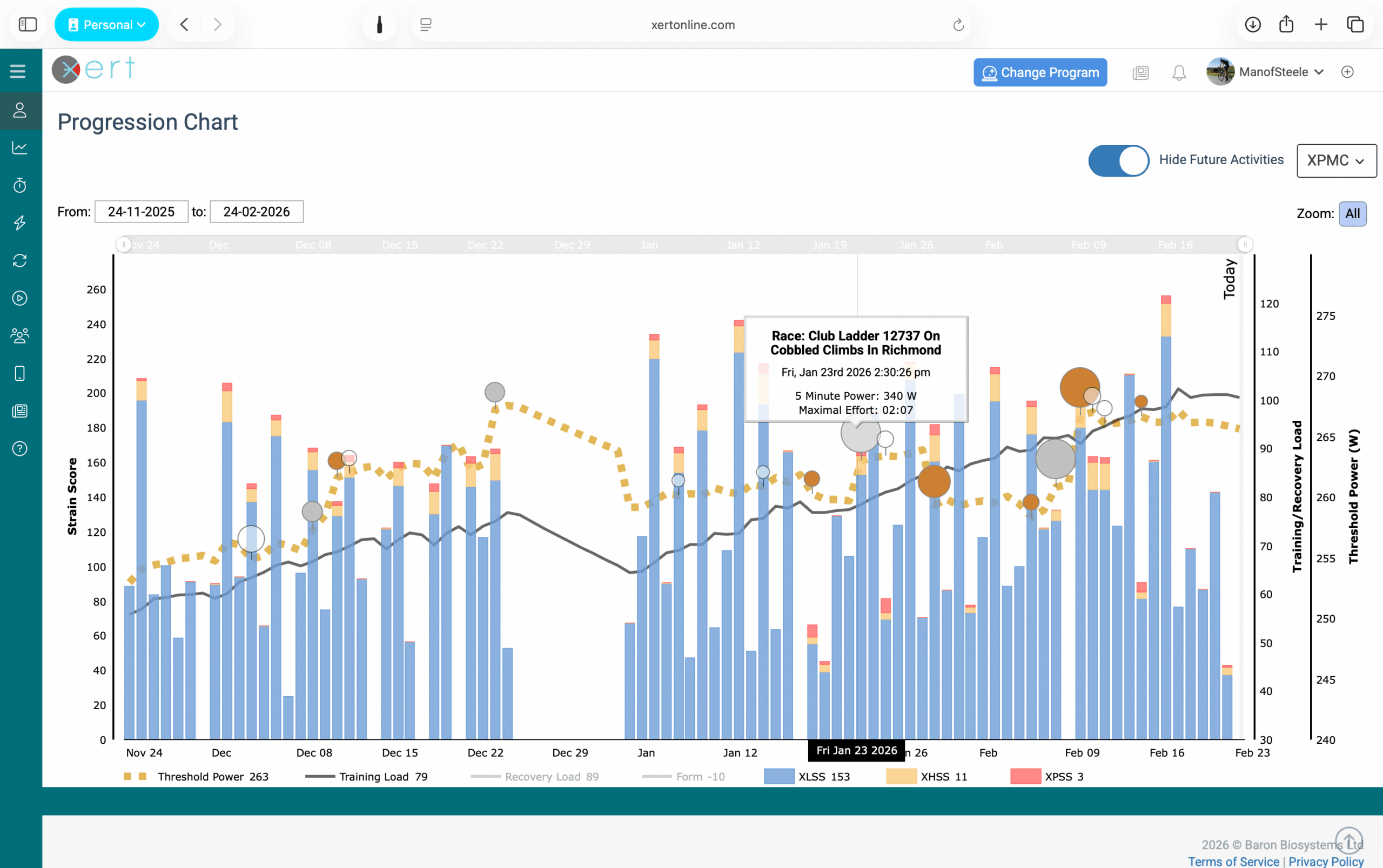
Small signature changes are normal. Day-to-day performance variation, fatigue, and variability in power data can cause minor variations. If a breakthrough (or near breakthrough) only changes your numbers slightly, it usually won’t materially affect your day-to-day training.
Step 1 — Check for obvious data issues
Before assuming your fitness is wrong, check whether one activity file contains bad data that has impacted other files. An example of an activity file with some invalid data is shown below.
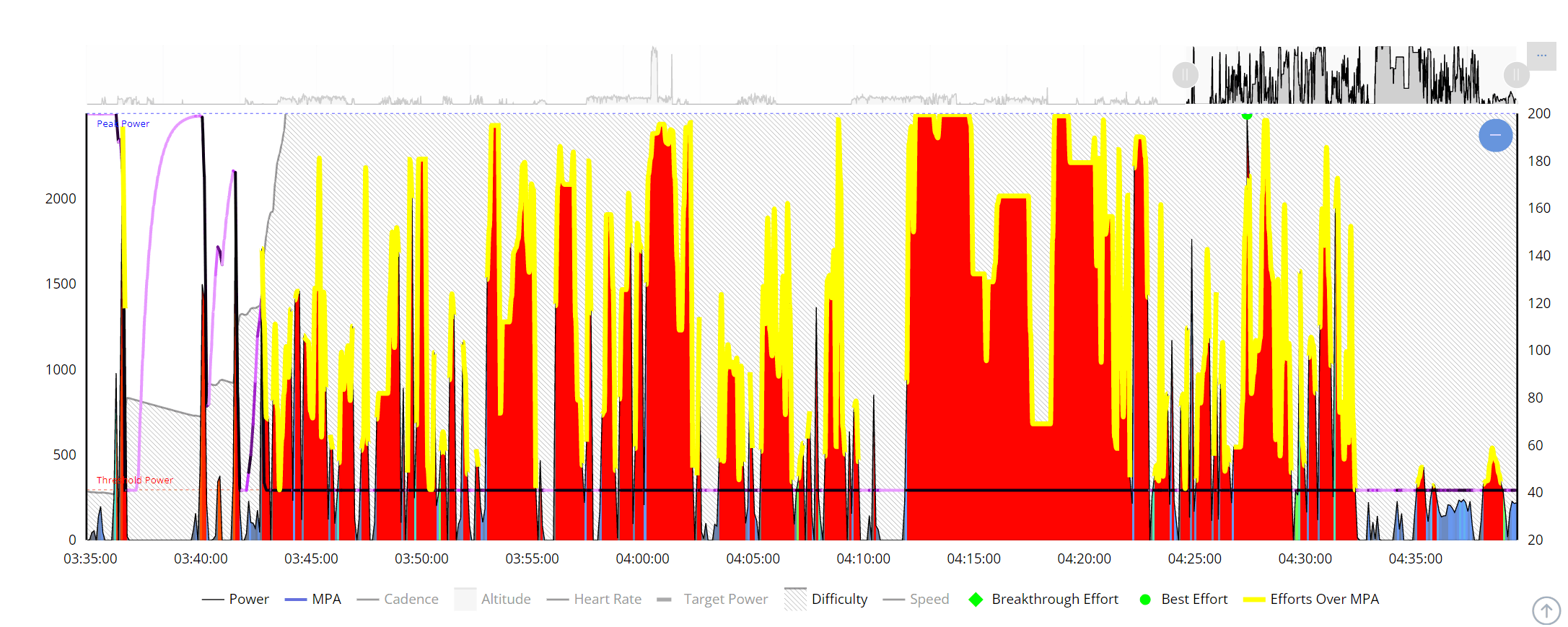
Look for Power Spikes or Corrupted Files
In your activities table, look for:
- Max power far above what you could possibly produce
- Sudden impossible spikes (e.g., 1600–2000+ W if you’ve never been near that), or
- Activities with abnormally high XSS totals
What to do:
- If an activity has obvious bad data, Flag it (or delete it if needed) so it doesn’t influence your progression.
- If you’re unsure which activity has caused the issue, support can help you identify it.
Related article: Flagging an Activity
Step 2 — Sanity-check Your Signature
Peak Power (PP): “Does this look like my max sprint?”
- PP reflects your maximum sprint power
- If you haven’t sprinted recently, PP can be underestimated.
- If PP looks wildly high, it's often caused by a power spike - sort activities table by max power and review the top activities for errors.
Quick verification: do 2–4 max effort 5–10s sprints with several minutes of easy riding between efforts.
Related Glossary: Peak Power
Threshold Power (TP): “Does this feel like my steady power?”
In Xert, TP is your highest steady power where MPA does not decline & it's conceptually similar to FTP. Most athletes can sustain something close to TP for roughly 40–70 minutes depending on conditions and pacing.
Important nuances:
- Xert's TP is not calculated from any FTP test protocol or a percentage of 20-minute average power.
- Xert derives TP from how you fatigue in real rides (MPA modeling), including intermittent efforts from races & workouts.
So it’s entirely possible for Xert’s TP to be higher than your recent 20-minute average power - especially if your best efforts occur under fatigue or in variable riding.
Related Glossary: Threshold Power
High Intensity Energy (HIE): “Does it match my ability above TP?”
HIE represents your capacity to do work above TP (measured in kiloJoules, kJ) and is tightly related to your Peak Power. Larger HIE generally means:
- More "punch" above TP and the ability to sustain hard efforts for longer
- A "wider" power duration curve in the ~2-10 min range
HIE often self-corrects with some good hard efforts in your recent data, especially sprints.
Related Glossary: High Intensity Energy
Step 3 — Does this match my training?
Open the XPMC (Progression Tab) and ask:
- Did TP jump sharply without a corresponding change in training load?
- Did your signature shift dramatically after a single activity that looks suspicious?
As a general rule, fitness tends to rise when training load rises and tends to stagnate/decline when training load stagnates/declines. If you see a major jump that doesn’t match your training context, it’s often due to:
- a bad file (spikes),
- uncalibrated power meter, or
- an unusual fatigue pattern during the key effort (stopping abruptly mid-effort, etc.)
Step 4 — If you don’t have recent maximal efforts, “anchor” your signature
The most common reason a signature seems wrong is simple: Xert hasn't seen you reach your true limits recently.
If you've imported mostly workouts done in ERG mode or easier endurance rides, Xert may not have the evidence it needs to model your best capabilities. In that case, doing some harder efforts would be best!
A Simple “Signature Anchor” Session
On a day you feel good, complete:
- 2–4 sprints: 5–10 seconds all-out, with full recovery between efforts
- 1 longer hard effort: ride 8–12 minutes hard to failure (or close).
This is often enough to dial in your PP, HIE, and TP without needing a formal fitness test.
Manually Adjusting Your Signature
If you have a strong reason to believe a specific activity's signature is wrong, you can manually adjust the signature values on that activity. See Manually Editing Your Fitness Signature on an Activity for the workflow, including when manual adjustment is and isn't appropriate.
Common Questions (FAQ)
Xert has my TP higher than my recent 20-minute power — why?
Xert doesn’t estimate TP from a fixed percentage of an MMP value. It uses your second by second MPA & Power data across real rides, including variable efforts like races. Maximal efforts under fatigue often won’t show as a clean “PR” in a simple power duration curve, but Xert excels at picking these up since fatigue is accounted for in the MPA calculations.
Xert’s Peak Power is slightly higher than my best recorded 1s power — normal?
Often yes. If your hardest sprint occurred under fatigue (MPA already suppressed), Xert may infer that your fresh maximum would be higher. Small differences are normal.
What’s a “good” HIE value?
There isn’t a universal “good” value. HIE varies widely by athlete type and sport. Use it as a personal metric — watch how it changes over time and how well it helps improve your performance above TP.
I can’t hold my Threshold Power for 60 minutes — does that mean it's wrong?
Not necessarily. Most athletes sustain TP-like power for ~40–70 minutes depending on conditions, pacing, motivation, temperature, fueling, and fatigue. Xert’s TP is defined by where MPA does not decline, and real-world pacing variability affects what you can hold steadily. This is an area of the model that we'd like to see improved in future iterations of Xert's MPA model.
After a short Zwift race with a sprint, Xert increased my TP. Is Xert overestimating TP from anaerobic riding?
Not necessarily. Xert uses your second-by-second MPA and power data to determine which signature parameters must change to explain your performance. In some cases, the only way to support a very strong sprint finish late in a race is for TP (and/or other parameters) to be higher.
Still stuck?
If your signature looks clearly wrong and you’re not sure why:
- Flag the suspicious activity (if any), and
- Contact support with the date(s) or URL(s) of the activity where the things changed.
We can help identify the file or effort that caused the model to drift and recommend the best fix.
Comments
0 comments
Please sign in to leave a comment.