
A Breakthrough in Xert occurs when your power output exceeds your Maximum Power Available (MPA), indicating improved fitness and prompting an update to your Fitness Signature.
A Near-Breakthrough happens when you nearly reach, but don't surpass, your MPA, often confirming current limits with minor signature adjustments.
Definition
A Breakthrough happens when your power output goes beyond the Maximum Power Available (MPA) predicted by your current Fitness Signature. This shows a real maximum effort and indicates that your fitness has improved. It can occur naturally as you push yourself during a ride and doesn't require any formal fitness testing.
A Near-Breakthrough occurs when you come close to reaching your MPA but don’t surpass it, or you stop before hitting your full potential for that ride according to Xert. This can often happen when you push hard on a climb but run out of road before you can continue your effort.
What It Represents
A Breakthrough confirms that your current Fitness Signature no longer fully explains your performance. In other words, you have demonstrated a new, improved capacity! In other words, you were able to push longer or harder than you were able to previously.
Typically, a Breakthrough requires your power to exceed your MPA for about 5 seconds or more. As a general rule of thumb, if you can stay above MPA for at least 5 seconds in real time, you’re in Breakthrough territory.
The longer you hold above MPA — and the further above it you go — the larger the resulting update to your Fitness Signature is likely to be.
Important Note: Real-time devices and apps provide an in-ride approximation, but the final determination is made during post-activity analysis on the server. After the activity is processed, Xert confirms whether a meaningful signature change occurred and awards the Breakthrough (if appropriate).
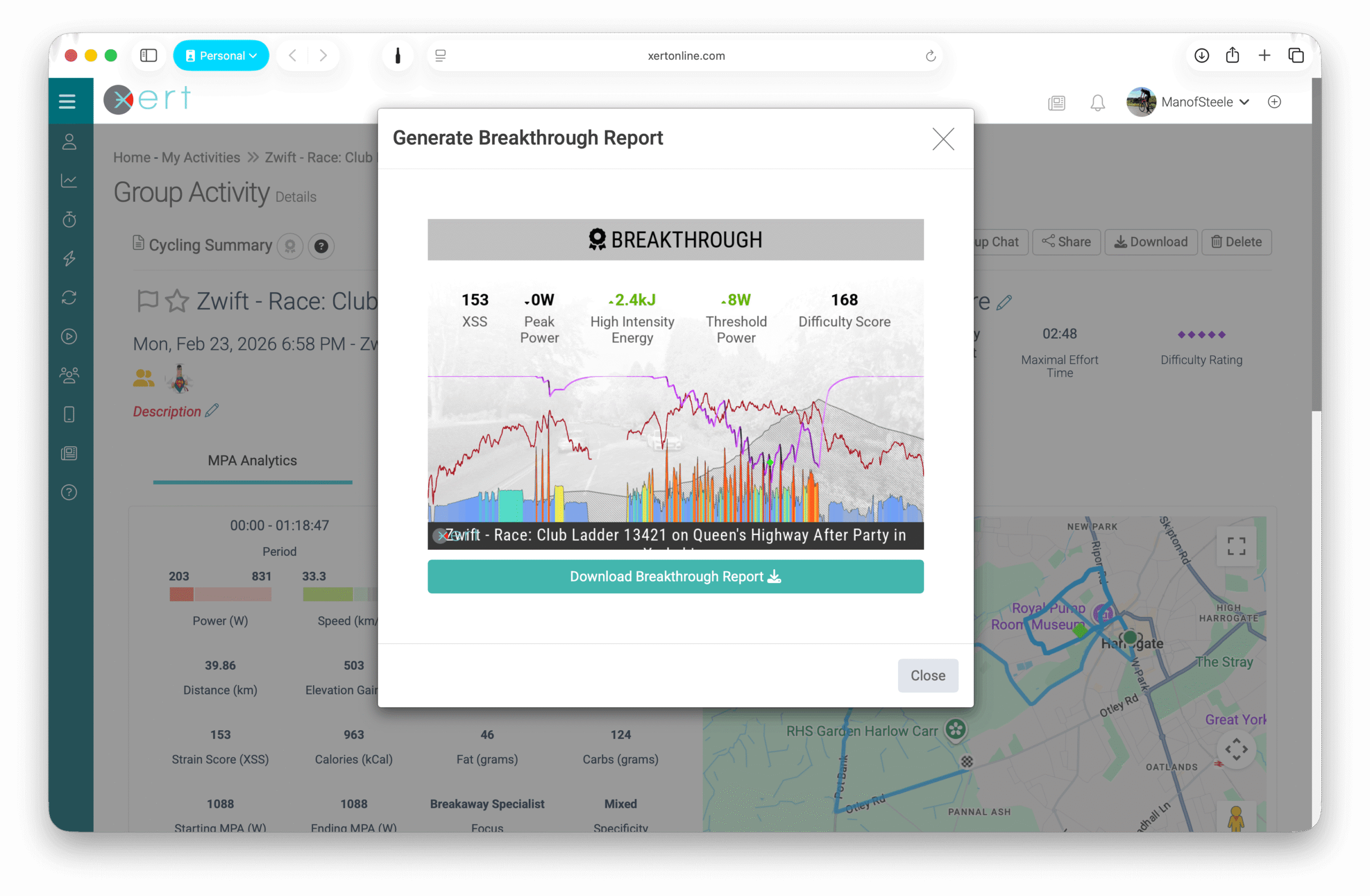
A Near-Breakthrough (sometimes informally called a “fakethrough” by Xerters) occurs when you approach Maximum Power Output (MPA) very closely but don’t surpass it. This suggests you were on the verge of your limits, but stopped short of what Xert considers achievable. Your signature is then adjusted to make the effort appear maximal, often resulting in a small decrease in your signature.
How Xert Uses It
When you push your limits during a workout or activity, you may receive a real-time notification on your Garmin ConnectIQ data fields or in the Xert EBC app.
When the system detects a Breakthrough effort in your ride data:
- Your Fitness Signature is recalculated and updated
- One or more of your signature parameters may increase.
Breakthroughs are categorized and displayed throughout the system based on how many systems improved:
- 🥉 Bronze Breakthrough - One aspect of fitness improved
- 🥈 Silver Breakthrough - Two aspects of fitness improved
- 🥇 Gold Breakthrough - All three aspects of fitness improved
After a (near) breakthrough is detected and a new signature is assigned, your activity metrics - including MPA, XSS, and Difficulty Score - are recomputed using the updated Fitness Signature. This ensures your training data remains accurate and consistent going forward.
A Near-Breakthrough occurs if you come very close to exceeding MPA but don't quite surpass it:
- Your Fitness Signature may slightly decline if the effort confirms your current physiological limits.
- MPA is recalculated using the adjusted signature to keep future modeling accurate.
NOTE: If you prefer to ignore a Near-Breakthrough, you can use the “Flag” button to prevent the signature from decreasing and retain the signature that existed at the start of that activity.
Where You’ll See It
You can view Breakthroughs:
- In real-time on Garmin Devices using ConnectIQ data fields or Xert EBC app
- On the Activity Dashboard
- In the Xert Performance Management Chart (XPMC)
- In post-ride activity details
After a Breakthrough or Near-Breakthrough, you can use the “Previous” and “Current” buttons below the MPA chart on the Activity Details page to compare MPA calculated with your old versus updated Fitness Signature:
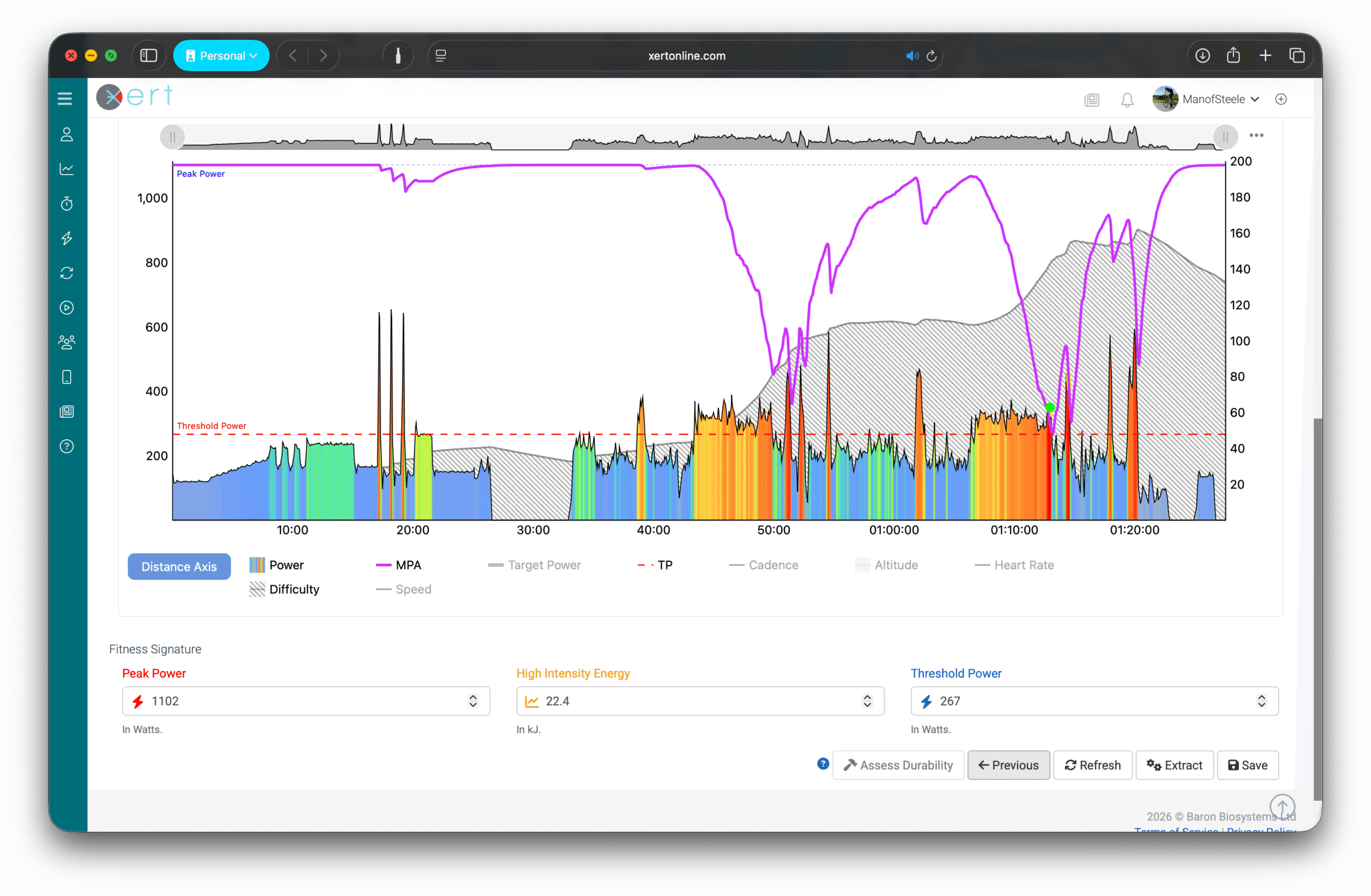
- Previous shows the MPA model using the signature that existed at the start of the activity. This should match what you saw in real time on your Garmin or in the Xert EBC app.
- Current shows MPA recalculated using your new, updated Fitness Signature.
This comparison allows you to clearly visualize how your performance model has been updated based on your effort.
Common Misunderstandings
- You must surpass MPA to achieve a Breakthrough. This can happen by either pushing above your MPA during a maximal effort, or by holding a steady effort above Threshold long enough to pull your MPA down to meet your power output.
- Near-Breakthroughs are not failures. They confirm your current physiological limits and help refine your Fitness Signature. They also provide an opportunity to reflect on pacing, fatigue, fueling, or readiness on a given day.
- A Breakthrough does not always increase all three signature parameters.You may even see one parameter increase while another decreases slightly - this is simply the model refining your Fitness Signature based on the data from your most recent maximal performance.
Comments
0 comments
Please sign in to leave a comment.