
Problem
You sent or scheduled a workout in Xert, but it doesn’t show up on your device or training app (Garmin Connect, Zwift, Rouvy, Wahoo, etc.).
Quick Fix
- Confirm the platform is Connected in Xert.
- Verify that your intended workouts destination is added in the 'Workout Players' section.
- On the Today page, Re-send the workout from the Workout Players section.
- Restart the app/device (force-close and reopen).
- Check the correct location in the app/device; some platforms might not show workouts in their calendar
If That Doesn’t Work
1) Confirm You Have a Workout to Send
Workouts can be sent in two ways:
- Scheduled workout in your Fitness Planner (including auto-scheduled Workout of the day/WOTD), or
- Manually sent from Workouts Page
If you have disabled the auto-schedule WOTD and you haven't manually planned any workout or manually sent a workout from the Workouts page, there may be nothing to send.
Check:
- Today page → is there a scheduled workout?
- Fitness Planner day → is a workout assigned?
2) Confirm Your Workout Player is Added
Verify that your desired destination is connected & that the app is shown under your Workout Players. Use 'Manage Players' to add additional apps/devices, if necessary.
Note: if planning to use the Xert Workout Player for Garmin ConnectIQ, be sure to add the Workout Player & send the workout specifically to the Xert Workout Player. Sending the workout to Garmin will allow you to complete the training using Garmin's native workout interface.
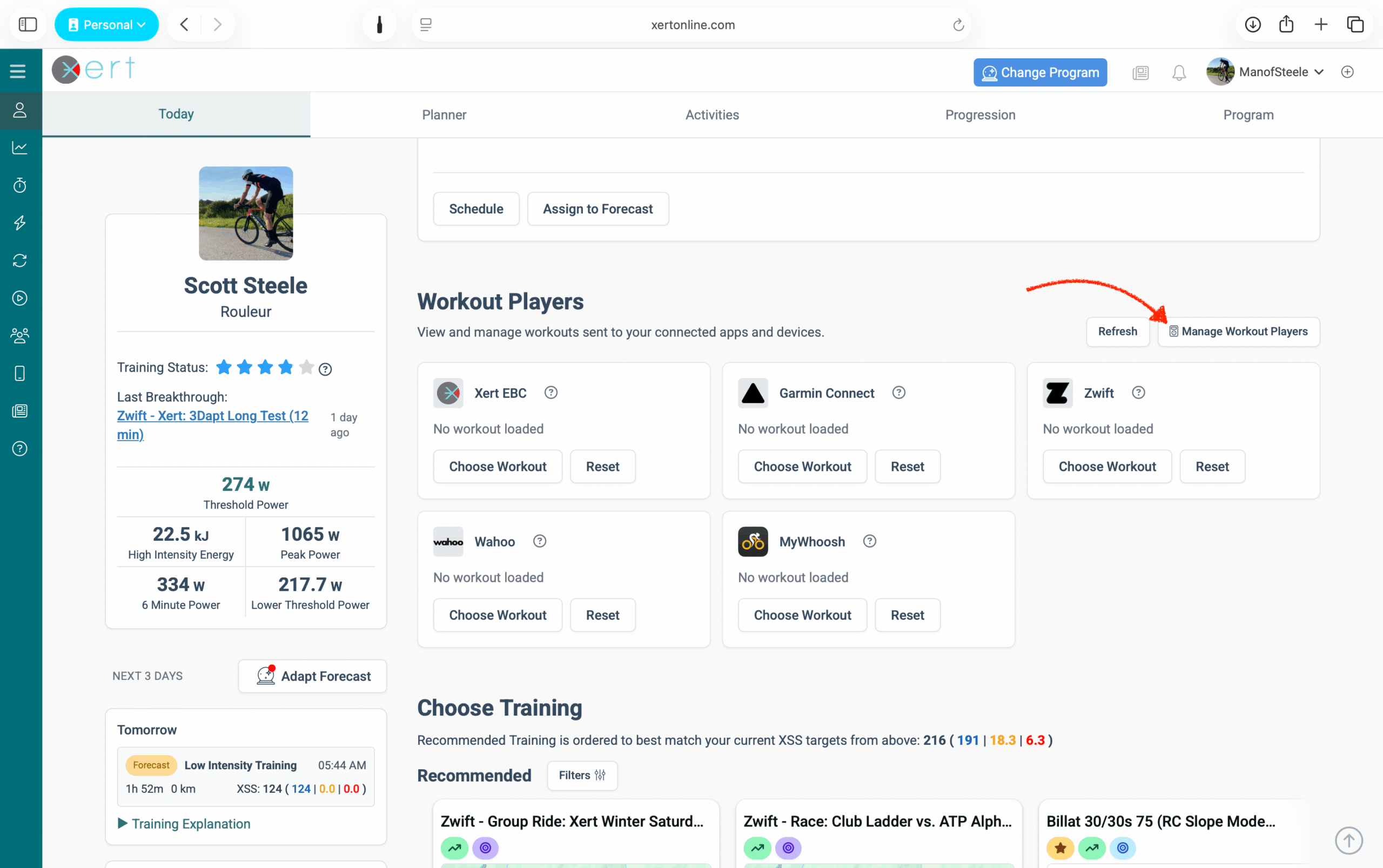
3) Confirm the Platform Connection + Permissions
Verify that your desired app is linked/connected to Xert. If it's not connected (or you’re unsure), Disconnect → Reconnect and re-authorize permissions.
4) Re-send the Workout
Even if you already sent it once, use the option to 'Re-send' the workout from the Workout Players section of the Today page (in Xert), then restart your desired app/device.
This resolves the majority of “not appearing” cases.
5) Know Where Your Workout Appears
Each platform will receive & display your recommended workout in different places.
Examples:
- Xert EBC: Sent workout should show as the 'Recommended Workout' at the top of the listing
- Garmin: Workouts will be shown under "Today's Activity" as Xert Cycling Workout
- Wahoo: Workouts will be shown under "My Plan" section of the Wahoo app
- Zwift: Workouts will be shown under "For You" and also in Custom Workouts (Xert folder)
- ROUVY: Workouts are shown in the Workouts > My Collections > Xert folder
- MyWhoosh: workouts are shown in the Calendar, but not the 'Workouts' section.
If you’re not sure, jump to the platform-specific notes below.
6) Check Platform Workout Limitations
Some platforms have limits that can prevent a workout from being delivered correctly, including:
- Maximum step count — Garmin has 50 step limit for imported workouts
- No ramped or curved intervals — Ramped/curved intervals may be converted to linear ramp or flattened to avg interval power, based on the platform
- SMART intervals lose dynamic behavior when exported (become fixed steps)
If the workout is very long/complex, try:
- sending an alternative, simpler workout (fewer steps), or
- us Magic Buckets feature to hit your training targets instead
Platform Quick Tips
Use these quick checks after you re-send:
- Garmin Connect: Look at "Today's Activities" in the Garmin Connect mobile or web app. If it's not seen there, try refreshing the app.
- Zwift: Check For You and Workouts → Custom Workouts (Xert folder), then restart Zwift.
- Rouvy: Re-send the workout and restart the Rouvy app.
- MyWhoosh: Re-send the workout and restart the MyWhoosh app.
- Wahoo: Refresh/sync in the Wahoo app and restart the device/app if needed.
Still Stuck?
Send support:
- which platform (Garmin/Zwift/Rouvy/etc.)
- the workout name + date it was scheduled
- screenshot of scheduled workout in Xert on Today page or Fitness Planner
- screenshot showing it’s missing on the intended platform
We can quickly diagnose whether it’s permissions, platform limits, or account mismatch.
Comments
0 comments
Please sign in to leave a comment.