
Your Fitness Signature is three numbers — Threshold Power, HIE, and Peak Power — that describe what you're capable of as an athlete. Xert updates these numbers automatically as you ride. This article explains how.
For a refresher on what the numbers mean, see Fitness Signature.
The Short Version
Xert finds the three numbers that best explain your actual ride data. When you produce power that those numbers say shouldn't be possible, Xert knows your fitness has improved and updates them for you!
The MPA Line: Xert's Prediction of What You Could Do
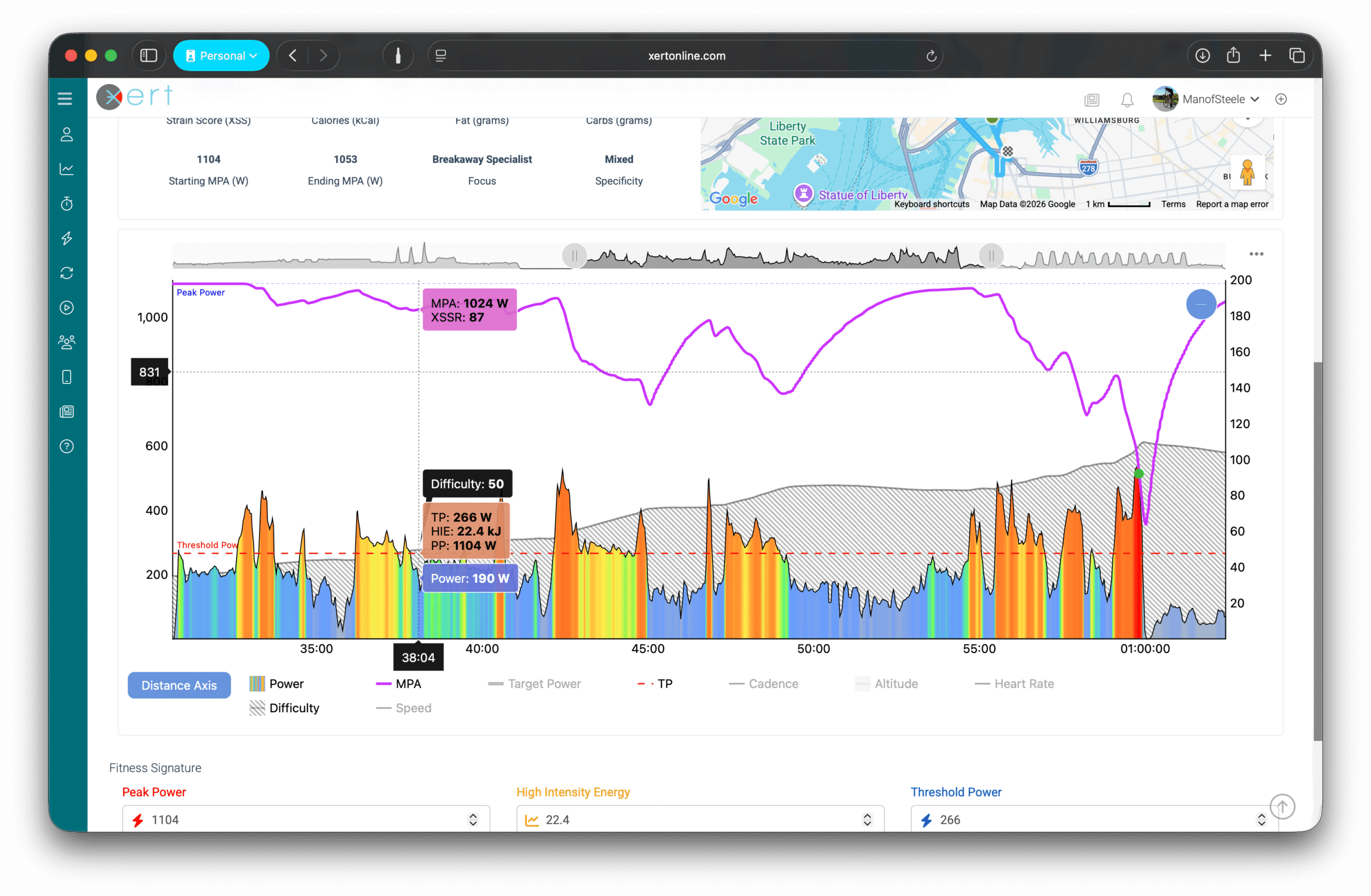
When you look at an activity in Xert, you'll see two lines on the chart:
- The magenta line is your Maximum Power Available (MPA) — Xert's second-by-second prediction of the highest power you can produce at that moment, based on your current Fitness Signature and how fatigued you are.
- The multi-colored line is your actual power output during the ride.
MPA changes throughout a ride. It drops when you ride hard (because you're fatiguing), and recovers when you ease off. At any given moment, MPA is Xert's best estimate of your ceiling at that moment in time.
When your actual power output gets close to your MPA line, you're riding near your limit. When the two lines touch, you've produced exactly as much power as Xert predicted you could!
For a full explanation of MPA, see Maximum Power Available (MPA).
How Xert Sets Your Three Numbers
Xert works out your Threshold Power, HIE, and Peak Power by finding the three values that best fit your actual riding. Specifically, the numbers should produce an MPA curve that your power comes close to — but never exceeds — in your hardest efforts.
When you produce power above what your MPA curve predicted was possible, it means at least one of your three numbers is set too low. Xert detects this and updates your signature. This is called a breakthrough.
Why This Is Different from "Best 20-Minute Power"
Most platforms estimate your fitness by looking at your best power over fixed durations — your best 20 minutes, your best 5 minutes, and so on. This works, but it misses improvements in real-world riding.
Xert's approach is different: it accounts for fatigue. If you do a 5-minute effort in the middle of a hard race, your average power will be lower than your fresh 5-minute best. A "best power" method would see this as a worse effort. But Xert knows you were already fatigued going into it, so your MPA was depressed. If you produced more power than your depressed MPA predicted, that's still a sign your fitness has improved — even though you didn't set a new 5-minute PR.
This is why Xert can detect fitness gains from training sessions, group rides, and races, not just from dedicated test efforts!
What a Breakthrough Means for Your Signature
When Xert detects a breakthrough, it updates at least one of your three numbers to match what you actually produced. Which number changes depends on how & where the breakthrough occurred:
- A breakthrough during a short, hard sprint tends to update Peak Power and HIE
- A breakthrough during a sustained effort above threshold tends to update Threshold Power
Your signature is now slightly higher than it was before, because Xert has seen evidence that you're capable of more than it previously estimated.
Important Note: It's possible for a breakthrough to raise one of your three numbers while lowering another. This isn't an error — your three numbers work together as a system, and Xert finds the combination that best fits all of your recent hard efforts. A breakthrough in one area can mean the overall best fit is a different balance between the three.
What This Means for You
- Ride normally and your signature stays current. Xert updates it whenever your efforts exceed its predictions.
- You don't need to do FTP tests. Xert extracts your signature from the riding you're already doing.
- Hard efforts are what move your numbers. Consistent training builds fitness, but your signature updates primarily through breakthroughs. If it's been weeks since your last breakthrough, Xert will flag your signature as "stale."
Where to Go Next
- Maximum Power Available (MPA) — deeper explanation of the MPA line
- Breakthrough & Near-Breakthrough — what these look like in your activities
- How to Analyze an Activity Using MPA — reading the MPA chart in detail
- How to Verify Your Fitness Signature — and what to do if it seems wrong — if your signature doesn't feel accurate
Comments
0 comments
Please sign in to leave a comment.