
Best for: Repeating a past event, group ride, segment-heavy route, or “summer epic” and targeting a stronger result(faster time, higher average speed, or improved performance at a different body weight).
In this guide: How Race AI works, how to set up a Race AI program, what each key setting changes, and how to interpret “achievability” results.
Quick Answers
- What Race AI does: Turns a past ride file into a goal and builds a training plan to help you beat it (or match it at a different weight).
- What you need: A past activity analyzed by Xert (or upload a file).
- How you “improve”: Increase target speed / reduce finish time and/or set a target weight and readiness.
- Key idea: Race AI plans Low / High / Peak XSS strain targets (not fixed workouts), so you can execute the plan your way (workouts, rides, group rides, races).
What Race AI Does
Race AI starts with a real ride—your past event or route—and uses your fitness signature, weight, plus the ride’s power and elevation profile to estimate the performance demands.
To make comparisons fair, Race AI uses Xert’s normalization concepts (including Xert Equivalent Power (XEP) and Kilogram Exponent (KE)) to translate “what happened on that course” into “what it would take” under different conditions—like:
- riding the same course faster,
- doing it at a lower (or higher) body weight, or
- combining both for a new target outcome.
Then Forecast AI generates the training targets needed to make that outcome realistic by your target date.
Key takeaway: Race AI doesn’t just tell you “go faster.” It translates a real route into a training target that matches the course demands.
Create a Race AI plan from a Past Performance
Step 1 — Open Race AI
- Go to Program
- Click Modify Plan
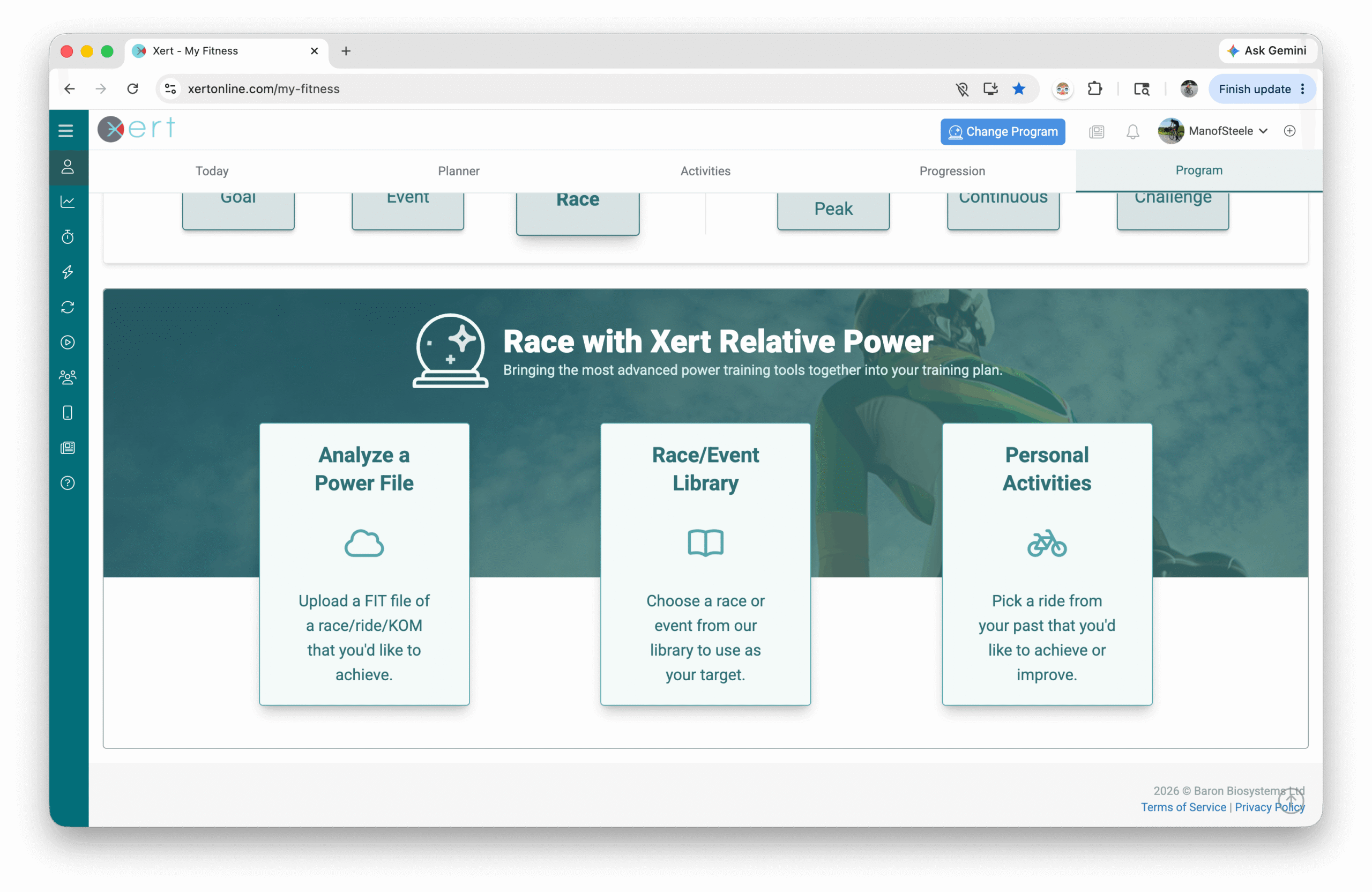
- Choose Race
Step 2 — Choose the ride you want to improve
You have three options:
Option A: Use one of your Xert activities
- Select Personal Activities - best when the activity is already in Xert
Option B: Upload a file
- Upload a ride file you haven’t added to Xert yet, or a file from a friend (useful when you want to target a route you haven’t done)
- Important Note: your uploaded file needs to have Power & elevation data. A raw GPX file or HR-only file won't work with Xert's RaceAI analysis.
Option C: Choose from the Xert Event Library
Step 3 — Set your target outcome
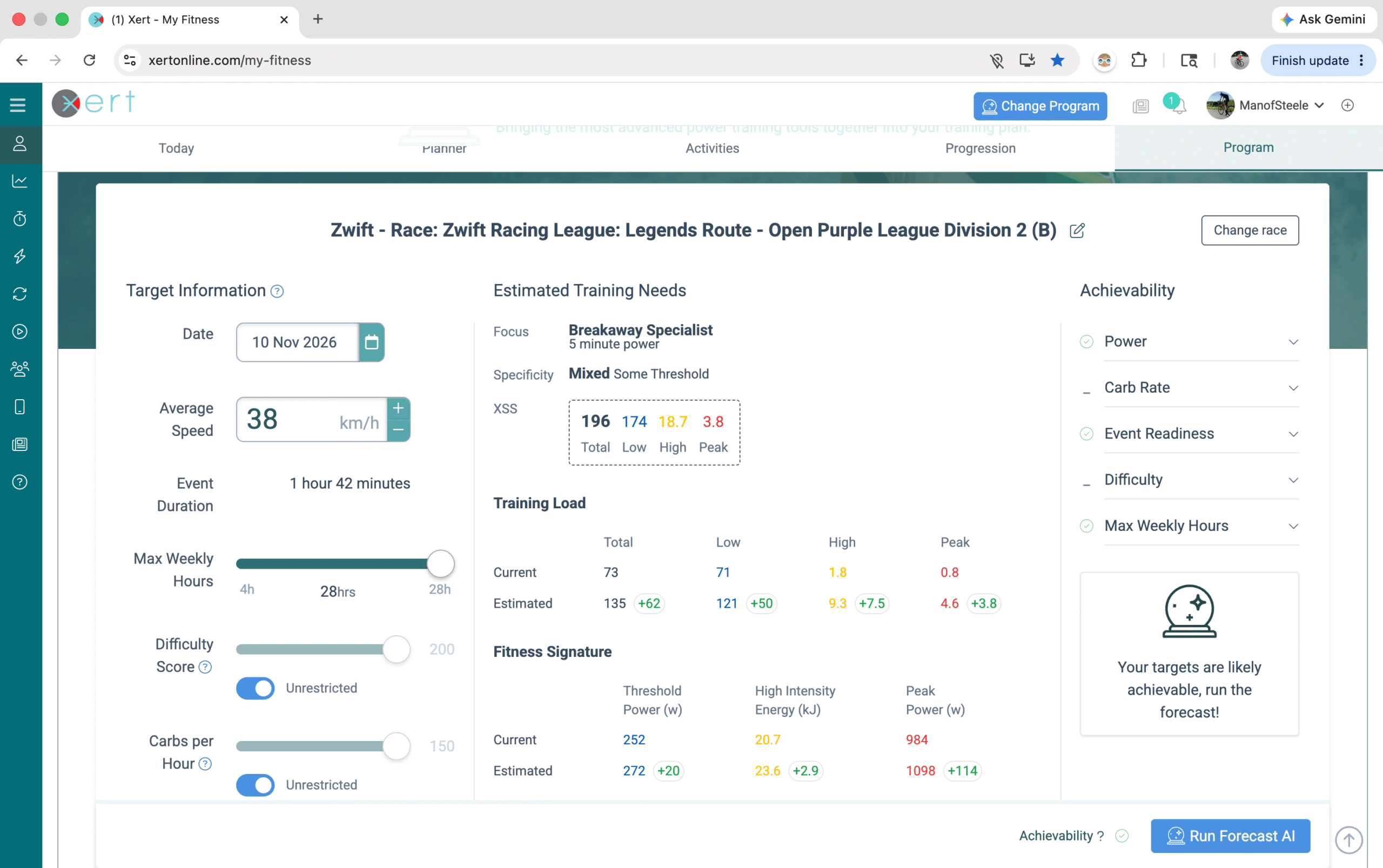
Race AI lets you define “better” in a few ways. You can use one or combine them:
- Target date: When you want to be ready
- Average speed / finish time goal: Make it faster
- Target weight: Set the weight you expect to race at
- Event readiness: Lower is “more ready” (more durable / less fade)
Step 4 — Optional settings
These are helpful if you want to fine-tune your program:
- Difficulty Score (default is usually fine) — cap the difficulty level (e.g. you wish to stay below a certain difficulty level). The lower this is set to, the higher your final signature will need to be, or the easier your targeted ride will need to be to generate a successful plan.
- Carbs per Hour (default is usually fine) — increase the signature to keep below a specific average carb rate (e.g. setting this to 90 tells the system to increase your signature such that you stay below 90g/hr carbs on the event date). The lower this is set to, the higher your final signature will need to be, or the easier your targeted ride will need to be to generate a successful plan.
- Weekly availability — set the days & times that you're available to train. By default, Xert uses your usual activity time/duration to set availability for your plan.
- Advanced Program Settings like recovery demands, polarization, periodization, etc.
Rule of thumb: Availability + target outcome are the two biggest levers. Most people can leave the rest of the settings on defaults.
Step 5 — Review Achievability
On desktop, Race AI provides an achievability summary on the right-hand side. On mobile, you'll scroll down a bit to see this.
Use these as a quick "reality check":
- If it suggests a constraint (time, readiness, target speed, etc.), adjust that first.
- If you’re time-crunched, consider setting a more realistic speed goal or increasing availability.
Based on the Achievability parameters, Xert will estimate if the plan is achievable by the targeted date, or if not, suggest the soonest date that you could achieve those results.
Step 6 — Run Forecast AI and Generate a Plan
- Click Run Forecast AI
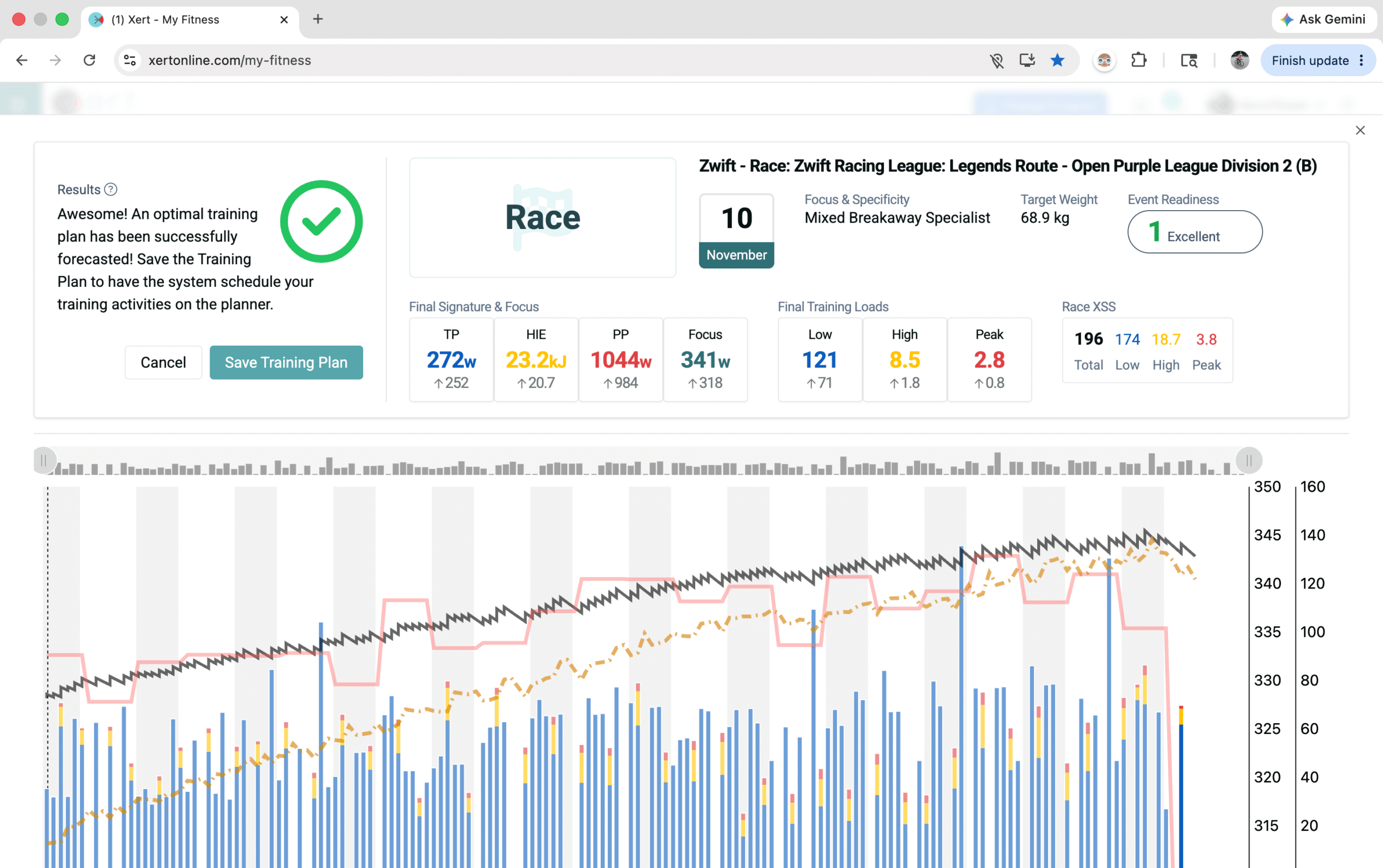
- Watch the plan build in the Forecast Chart / Planner preview
- If everything looks good, Save the program to apply it to your Planner
Interpreting Forecast AI Results
Achievable!
Xert can meet your target outcome within your constraints (availability, recovery needs, target date, etc.).
Achievable, but “tight”
Xert can build the plan, but it may warn you there’s limited flexibility. That usually means:
- you’re time-crunched,
- you don't have sufficient time until your target date,
- the target is ambitious, and/or
- your readiness goal is very aggressive
What to do: Keep the plan, but try to avoid missed key days—or relax one constraint (availability, target speed, readiness).
Not Achievable
This doesn’t mean you can’t improve. It means given your current time + settings + target, Xert doesn’t see a reliable path to the exact outcome you're looking for. This could be related to the same issues highlighted above.
To resolve this, there are several options you might consider:
- Increase training availability/max weekly hours
- Reduce the target speed / make the goal less aggressive
- Choose a less strict event readiness target
- Extend the target date
Tips for Better Race AI outcomes
- Use a representative ride file: If the event is variable, pick the ride that best matches what you want to be ready for.
- Don’t over-tweak settings: Most success comes from the big levers: target date, target speed/time, availability, and readiness.
- Pin your “must-do” rides: If you have weekly group rides or tune-up races, pin them and adapt forecast so the plan builds around them.
Common Questions (FAQ)
Does Race AI only work for races?
No—Race AI works great for any ride goal: group rides, epic routes, segments, fondos, or “I want to beat my PR on that climb-heavy loop.”
Do I have to follow structured workouts to improve on the race plan?
No. Race AI (via Forecast AI) plans strain (XSS) targets. You can achieve them with workouts, free rides, group rides, races, or Magic Buckets!
What if my schedule changes after I save the plan?
Use Adapt Forecast to re-optimize the plan around what actually happened and what you can still realistically achieve.
Comments
0 comments
Please sign in to leave a comment.