
Best for: Garmin, Karoo (Xert EBC extension), and Xert EBC (Android) users who want to understand what Magic Buckets is telling them in the moment—and how to follow the guidance during free rides, group rides, races, or indoor sessions.
In this guide: The two modes (Endurance vs Intervals), what each state means, how states change, Garmin beep alerts, and annotated screen examples.
Quick Answers
- Magic Buckets helps you achieve your Low / High / Peak strain targets (XSS) for the day (or from a scheduled workout) in a dynamic, adaptive way.
- The state label (e.g., INTERVAL, RECOVERY, RIDE EASY) tells you what to do right now.
- Push above Threshold and hold the intervals as long as you can (or want to), then easy back off below Threshold to start your recovery. Repeat this process until the buckets are full!
What Magic Buckets is Doing
Magic Buckets is not a rigid interval workout. Instead, it uses your Fitness Signature, and your remaining Low / High / Peak XSS targets to provide live guidance so you can complete today’s training targets during any ride.
Key idea: You don’t need perfect terrain, and you don’t need to follow pre-set interval durations. You’re simply using real-time feedback to “fill the buckets” efficiently.
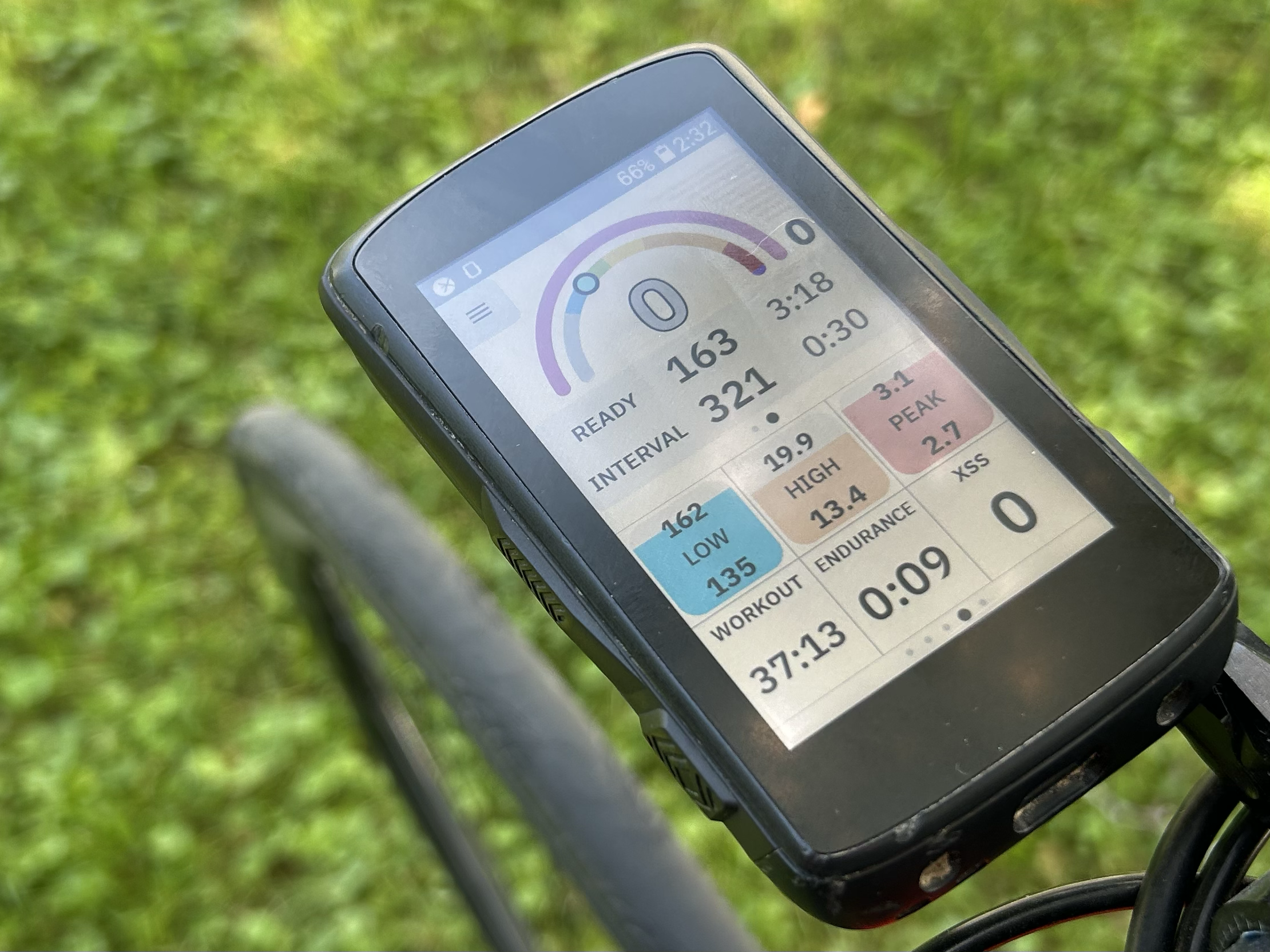
Two modes: Endurance vs Intervals
Magic Buckets determines the mode based on today’s targets:
A) Endurance Mode (Low Intensity Day)
If your day is entirely Low XSS, Magic Buckets provides only an endurance target:
- it focuses on filling the Low bucket
- it gives steady guidance to keep you in the right intensity range
B) Magic Intervals (High Intensity Day)
If your day includes High and/or Peak XSS targets, Magic Buckets provides interval guidance:
- it warms you up, then prompts work/recovery cycles until your Low, High, & Peak buckets are all filled
- it adapts to how hard you actually go & recover
Magic Buckets States
Magic Buckets traditions between various states as you complete your ride. Each state defines what you should do right now, what target power is shown, & what triggers the next state transition.
Low Intensity Ride States & Targets:
State |
What It Means |
Target Shown |
Moves on when... |
|---|---|---|---|
START |
Waiting to begin the ride |
~87.5% LTP |
Activity starts / you begin riding |
ENDURANCE |
Filling the LOW bucket |
~87.5% LTP |
Low Bucket reaches it's target |
FINISHED |
Low target achieved |
~65% LTP |
Targets completed (further riding is optional) |
REST DAY |
No Targets Today |
~65% LTP |
-- |
High Intensity Ride States & Targets:
State |
What It Means |
Target Shown |
Moves on when... |
|---|---|---|---|
START |
Waiting to begin the ride |
~87.5% LTP |
Activity starts / you begin riding |
WARMUP |
Easy riding until warmup strain is reached |
~87.5% LTP |
XLSS ≥ 10 |
READY (1) |
Ready for the first interval |
~87.5% LTP |
Power rises above TP for ~4s |
INTERVAL |
High-intensity work interval |
INTERVAL PWR* |
Power drops below TP for ~4s |
RECOVERY |
Recovery between intervals |
RECOVERY PWR* |
Recovery timer counts down to 0 |
READY (2) |
Ready for next interval |
~65% LTP |
Power rises above TP for ~4s |
EASY |
High/Peak done; finish Low bucket if time remains |
~87.5% LTP |
<5 minutes remain to fill Low |
COOLDOWN |
Final Low-bucket fill / cool-down |
~65% LTP |
Low bucket reaches target |
FINISHED |
All buckets filled |
~65% LTP |
-- |
*Note: INTERVAL PWR and RECOVERY PWR are calculated dynamically based on your remaining Low/High/Peak targets and current fatigue.
Below is the same information summarized in plain language:
Endurance Mode States (Low Intensity ride)
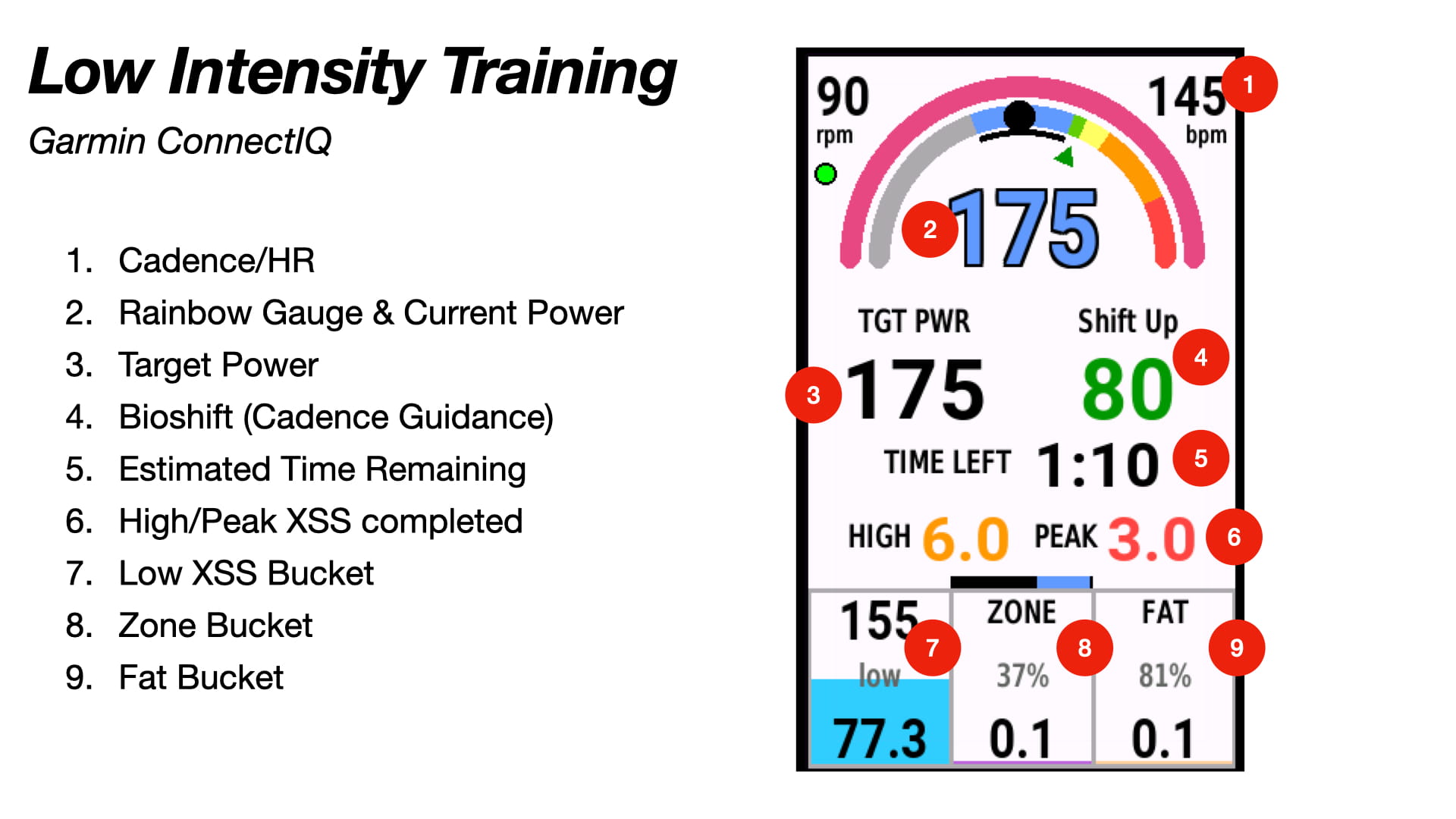
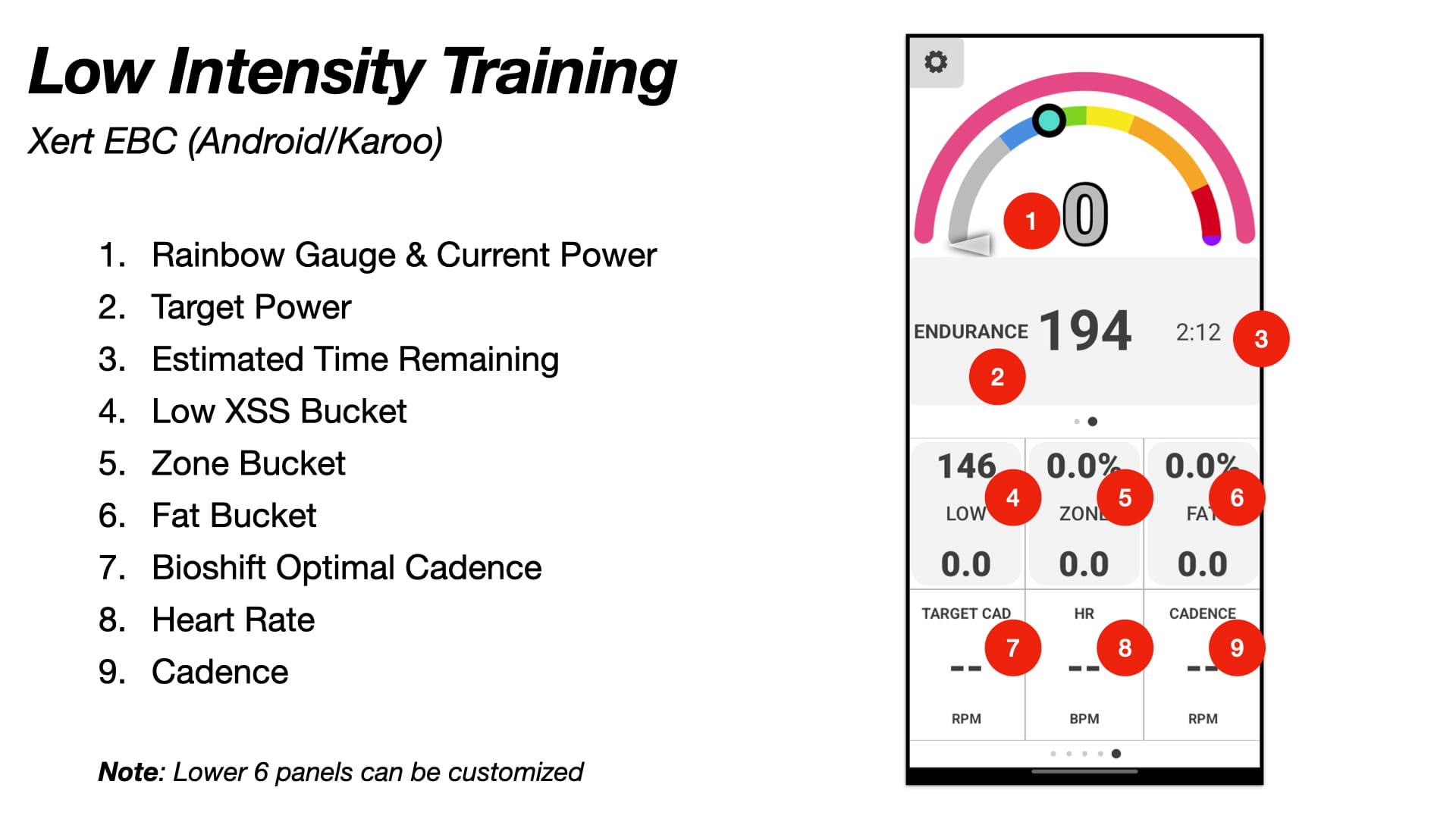
START
What it means: Connected/fetched and waiting for you to start moving.
What to do: Start riding!
ENDURANCE
What it means: Low bucket isn’t filled yet.
What to do: Ride steady at the suggested endurance intensity.
FINISHED
What it means: Low bucket is filled.
What to do: You’re done—ride easy or end the session.
REST DAY
What it means: No targets today (XSS targets = 0).
What to do: Rest, or ride purely optionally.
Important note — Endurance Mode display
On low-intensity days, the Garmin Magic Buckets field replaces the High and Peak buckets with Zone and Fat buckets. In the Xert EBC app, you can still view the Low/High/Peak buckets—just swipe one more page in the Magic Buckets screens.
- Zone (purple bucket) = XSS accumulated while riding roughly 75–100% of LTP (steady endurance range).
- Fat (orange bucket) = the portion of strain Xert estimates was fueled primarily by fat metabolism.
It’s normal for Zone and Fat to fill more slowly than Low, and they may not “fill” completely—especially with lots of coasting, stops, surges, or intensity spikes. In general, higher Zone/Fat values tend to reflect a smoother, more consistently paced endurance ride.
Interval Mode States (High Intensity ride)
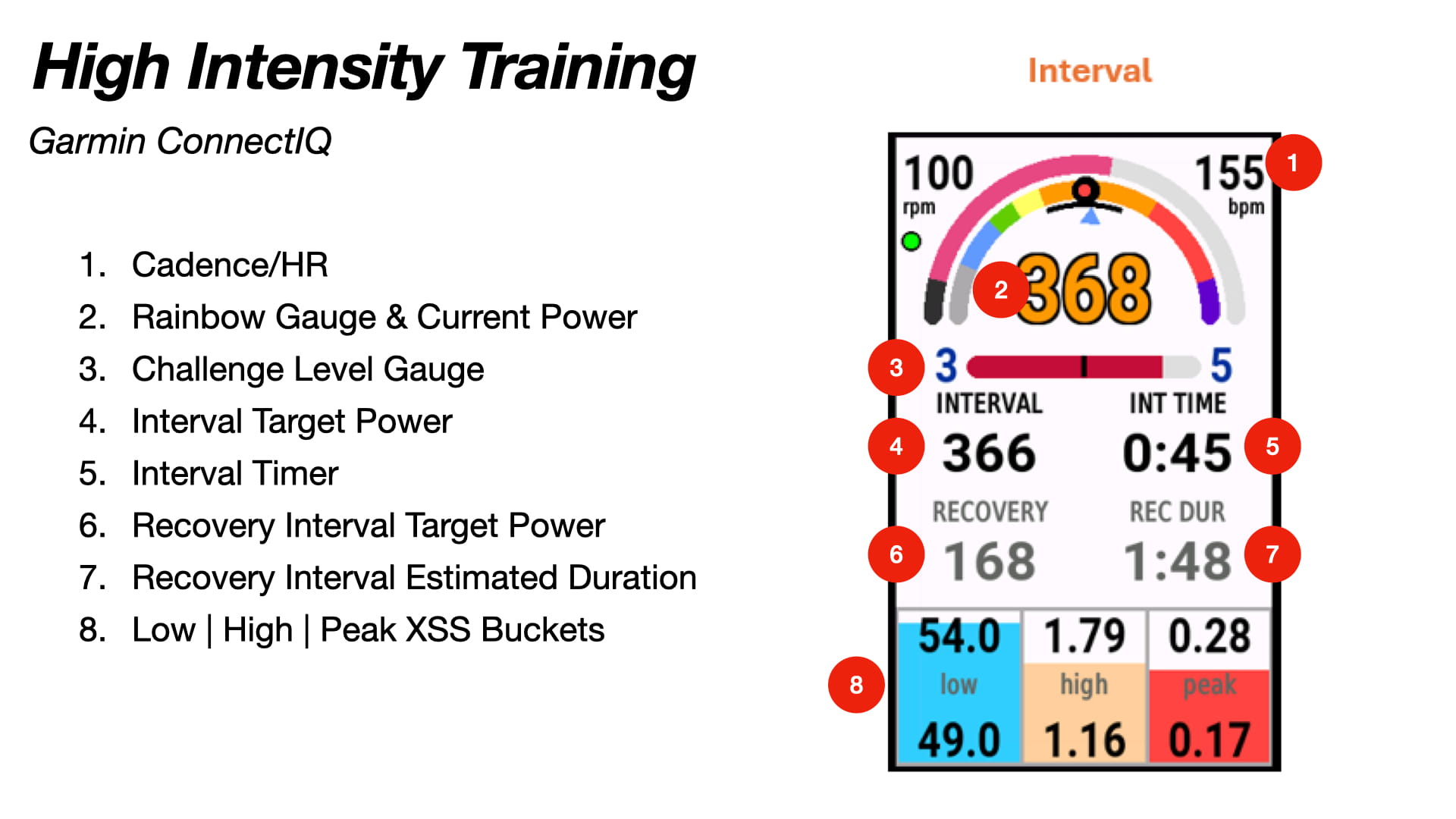
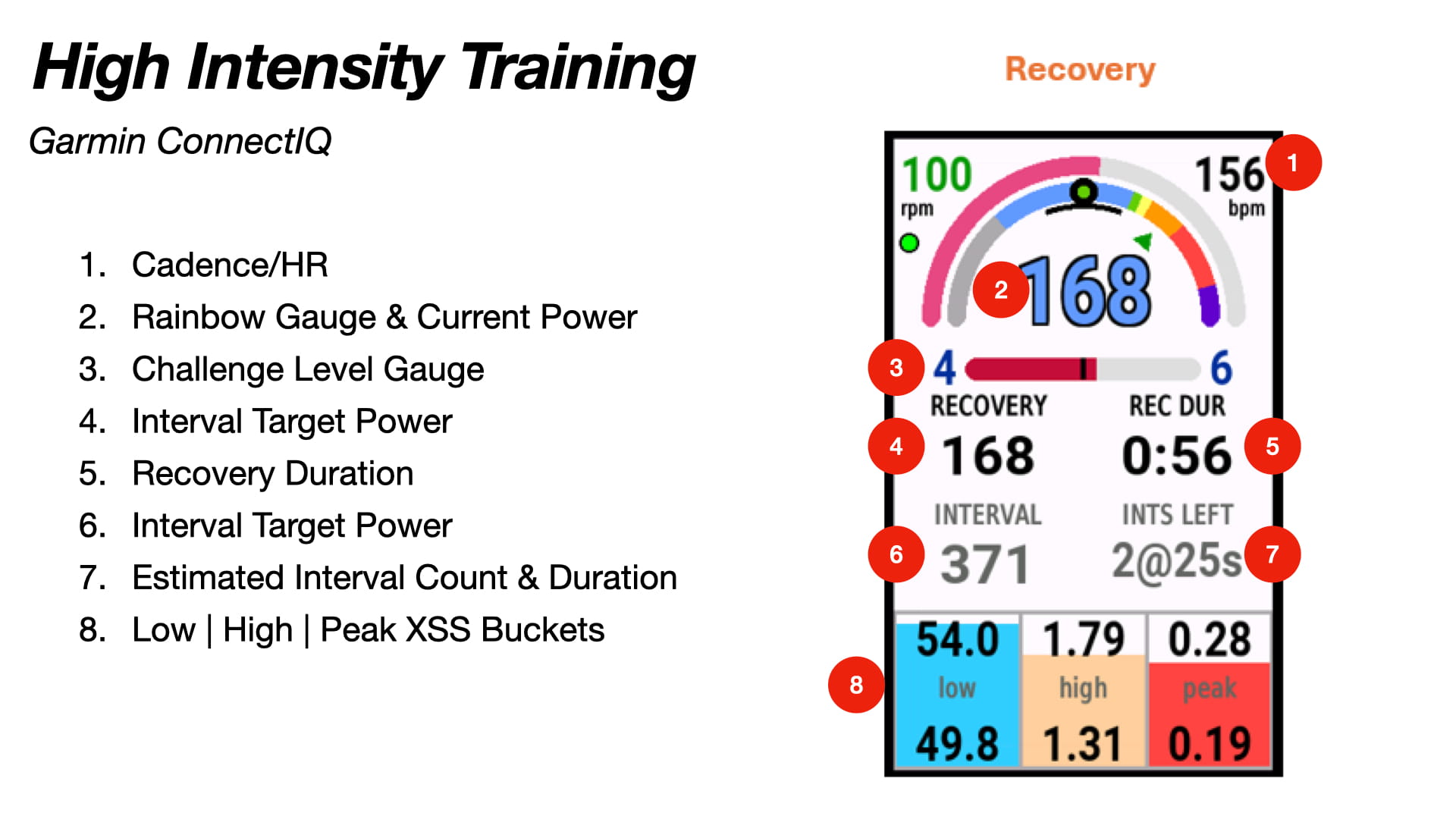
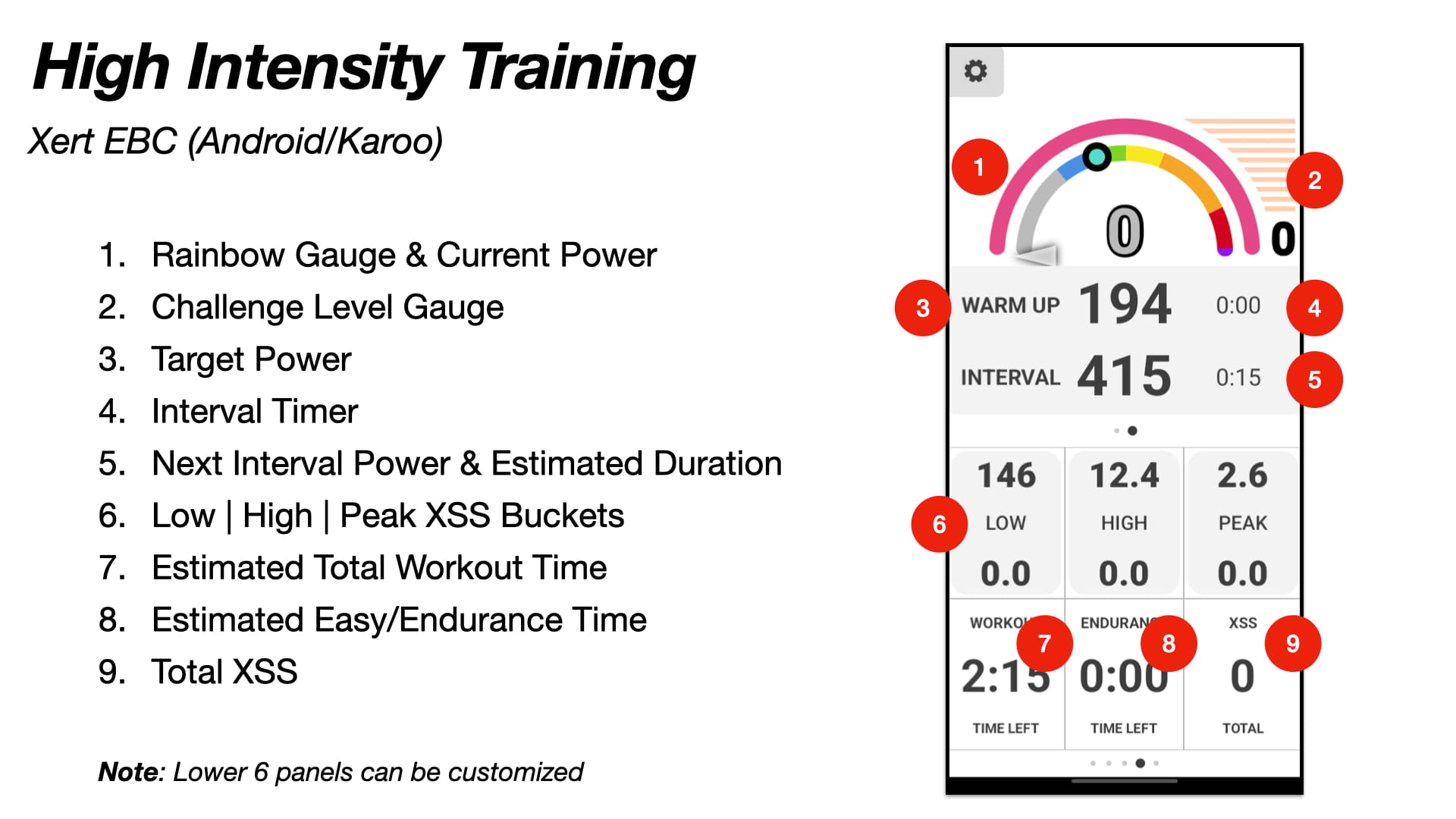
START
What it means: Waiting for you to begin riding.
What to do: Start moving.
WARMUP
What it means: Warmup until you’ve accumulated 10 Low XSS.
What to do: Ride steady. No need to force intensity yet.
READY 1/2
What it means: You’re ready for the next interval—Magic Buckets is waiting for you to “start” the effort.
Trigger: Once your power goes above threshold for a few seconds, it moves into INTERVAL.
What to do: When you’re ready, push above TP to begin the interval.
INTERVAL
What it means: You’re in a work interval; buckets will fill fastest here.
Trigger: Power above TP for ~4 seconds.
What to do: Push and hold. The “interval timer” will count up as you hold your effort above Threshold.
RECOVERY
What it means: You’ve backed off below TP; recover at the shown recovery power.
Trigger: Power below TP for ~4 seconds + recovery timer running.
What to do: Ride easy/steady at recovery target until the recovery timer expires.
EASY
What it means: High & Peak targets are filled, and there’s still meaningful time remaining.
What to do: Ride comfortably—don’t force intensity. Let the system guide you to finish Low.
COOLDOWN
What it means: Only a small amount of Low remains (typically <5 minutes worth).
What to do: Ride easy and finish filling Low.
FINISHED
What it means: All buckets filled.
What to do: You’re done - end the ride or cool down.
How to “Ride” the Intervals
This is the part that reduces confusion the most:
Starting an Interval
- When you see READY, you control the start.
- Push above TP for 4 seconds → the display automatically switches to INTERVAL.
Interval Duration
Magic Buckets does not require a fixed interval duration.
- The interval timer will count up
- You can end the interval whenever you choose by backing off below TP
Recovery Duration
Recovery does have a timer:
- recover until the timer expires, then start your next interval
- if you need a break, continue pedaling easy and you'll drop back into READY state. This can be helpful for breaking your ride into "sets". For example, aim to fill 1/4 or 1/3 of your High/Peak buckets, then take a rest & start again.
Rule of thumb: Intervals are “as long as you can / choose.” Recovery is typically “until the timer ends.”
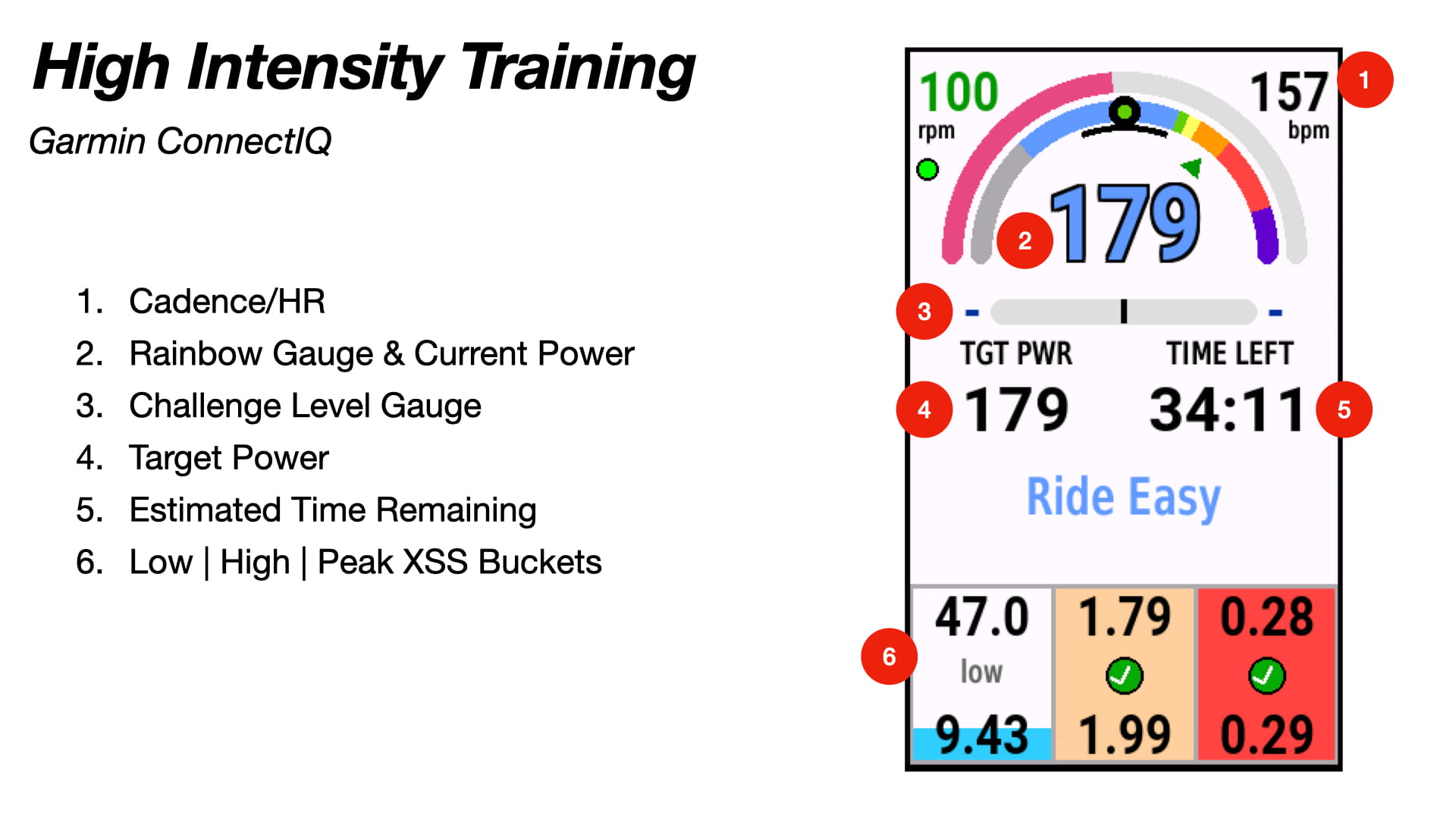
Interpreting Buckets + “Time Left”
Most Magic Buckets screens include:
- bucket progress (Low/High/Peak)
- target power guidance (work or recovery)
- a time remaining estimate
How to think about “Time Left”:
- It’s an estimate of how long it should take to finish the remaining targets if you follow guidance.
- If you go harder, time can drop. If you go easier, time might extend.
Summary Screens
Magic Buckets also includes a Summary Screen that gives you extra context about the session (e.g., interval totals, Challenge Level stats, recovery estimates, and more).
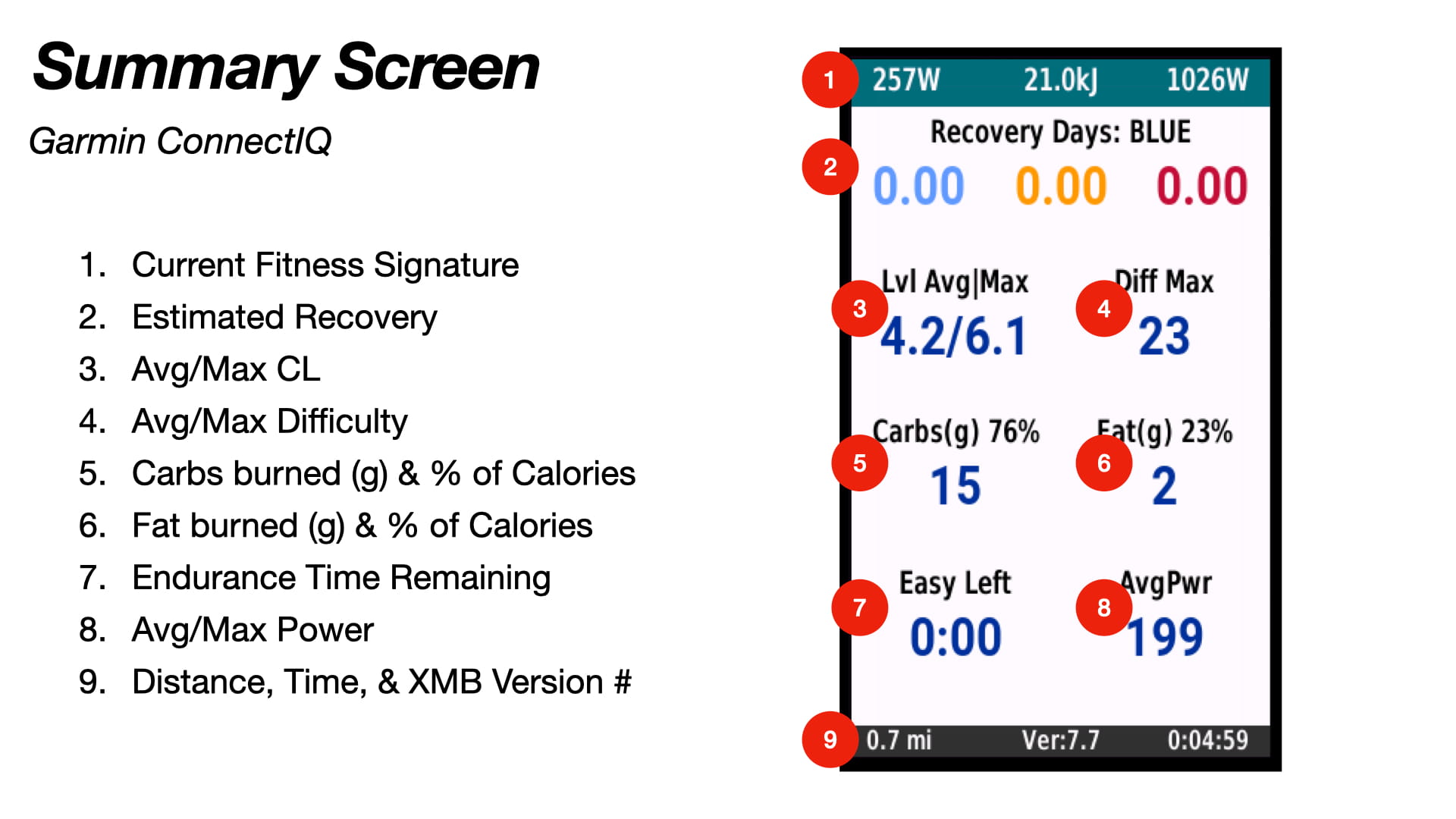
On Garmin devices:
- Edge 840/850 & 1040/1050: Tap the Rainbow Gauge at the top of the data field to open the summary.
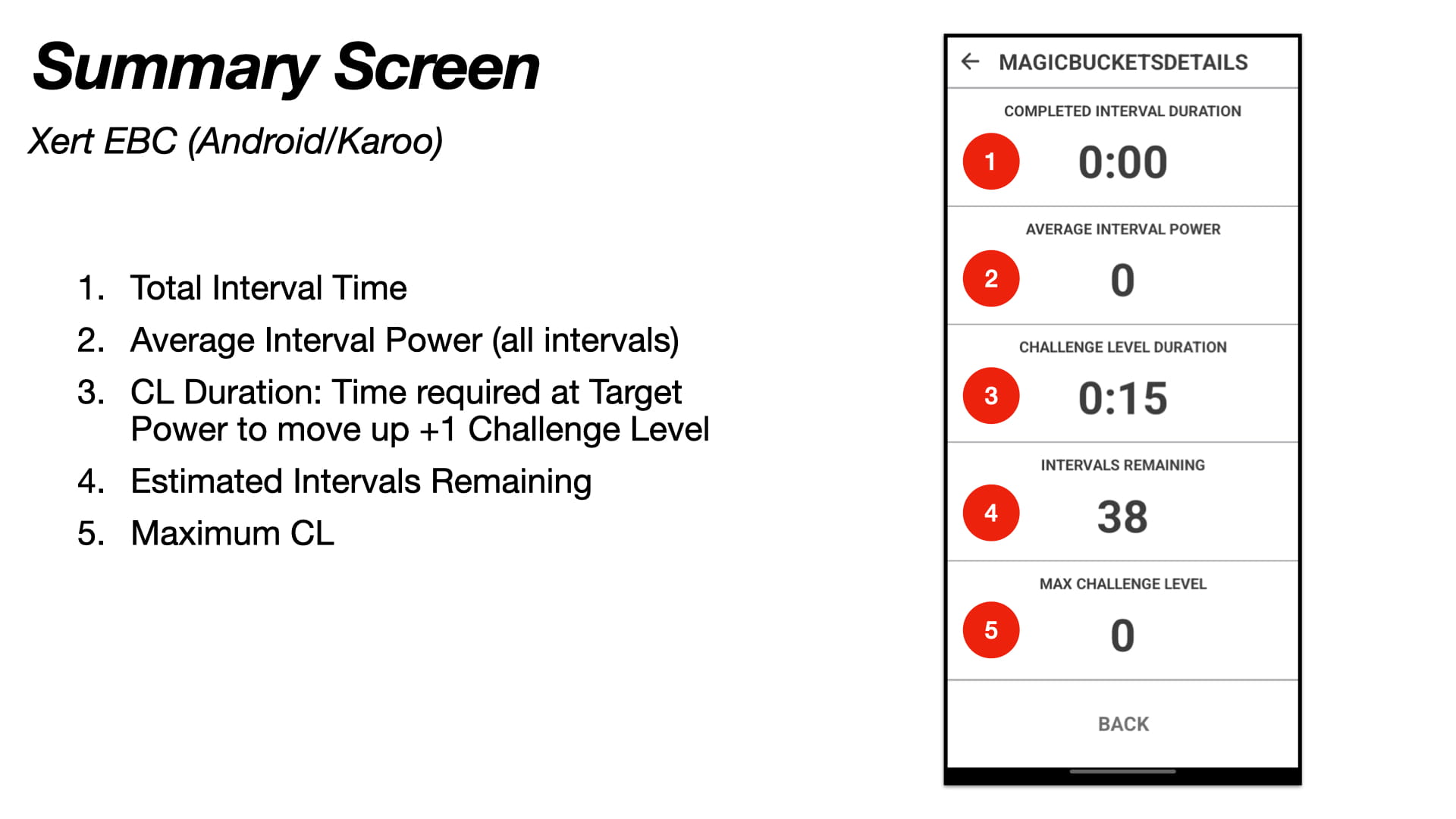
On Xert EBC (Android & Karoo):
- Tap the interval panel/interval section to open the Magic Buckets summary screen.
Garmin Beep Alerts
On Garmin, Magic Buckets can use beep alerts to confirm key moments:
- Settings changed (targets/settings updated)
- Server fetch received (targets successfully loaded)
- Endurance ride: Low bucket completed
- Interval ride: Low/High/Peak buckets completed
- Breakthrough achieved
Tip: If you’re new to Magic Buckets, beeps are helpful—especially during races or group rides when you aren’t staring at the screen.
Common questions (FAQ)
“Why does it switch between Endurance and Intervals?”
Because the mode is determined by today’s targets. If your day includes meaningful High/Peak targets, you’ll see the interval state machine. If it’s mostly Low, you’ll see endurance guidance.
“Can I change what it’s asking me to do today?”
Yes—if you want to change today’s behavior, adjust the daily Target XSS values (Today page daily summary). Mode will reflect the new targets.
You can even change your targets in the middle of a ride. Press stop/start to fetch the updated targets from Xert.
“Do I need to send a Magic Buckets workout to use the data field?”
No. You don’t need to generate/schedule a workout just to use Magic Buckets in real time. The data field uses the XSS values from the Adaptive Training Advisor or Forecast AI placeholder.
Comments
0 comments
Please sign in to leave a comment.