
Training Surplus and Deficit in Xert indicate if you are training above or below the amount needed for your chosen Improvement Rate (IR), calculated over a rolling 7-day window. Xert’s Adaptive Training Advisor uses this to adjust daily recommendations, aiming to keep your training balanced over time rather than achieving a zero deficit daily.
Definition
Training Surplus & Deficit show whether you are currently training above or below the amount needed to meet your selected Improvement Rate (IR).
Adjusting your Improvement Rate will directly affect your Surplus or Deficit. Increasing your IR typically results in higher recommended training (build phases), while lowering it reduces training demands (recovery or rest periods).
- A Deficit means you have trained less than required.
- A Surplus means you have trained more than required.
What It Represents
Xert compares the amount of training you have recently completed, relative to the amount of training required to achieve your selected Improvement Rate. This comparison is calculated using a rolling 7-day window, rather than being a weekly calculation.
Your Training Surplus or Deficit gives you feedback on whether you are:
- Training more than necessary
- On track, or
- Falling behind
How Xert Uses It
The Xert Adaptive Training Advisor (XATA) uses your surplus or deficit to adjust daily recommendations, in combination with your available training time.
- If you have a large deficit, XATA might increase your Recommended XSS targets to help you catch up.
- If you have a large surplus, XATA may recommend lighter sessions or additional recovery.
The Training Pacer Gauge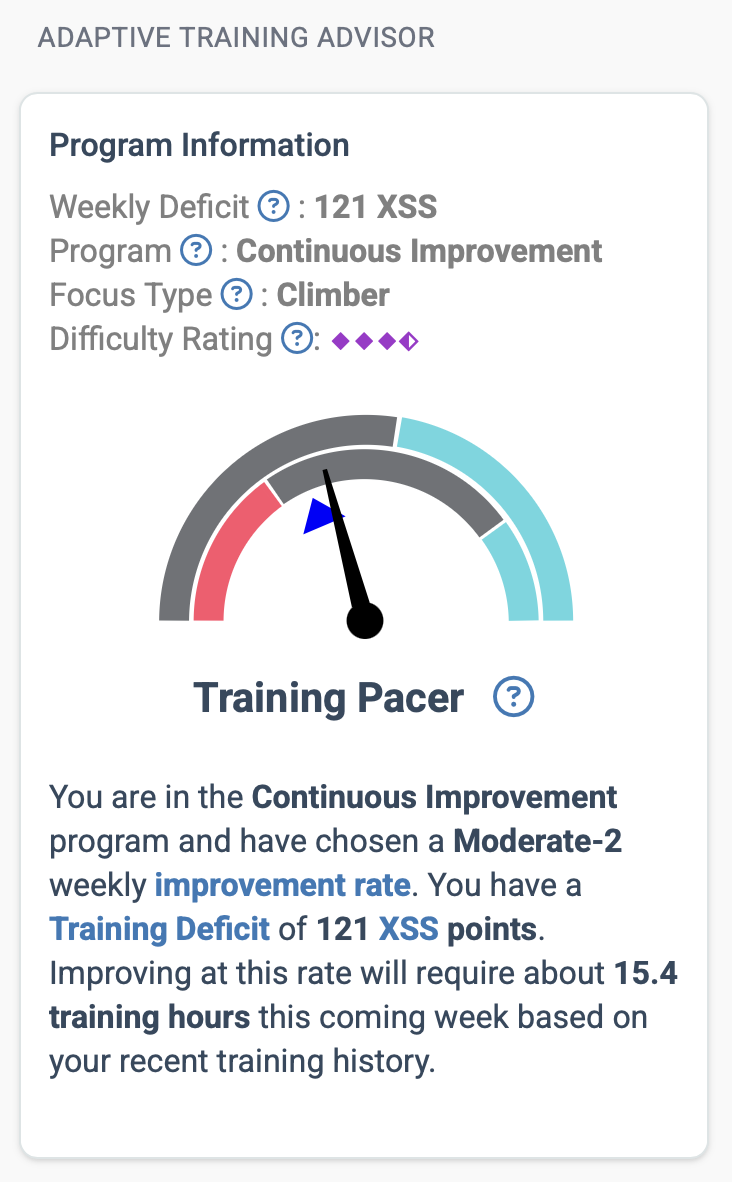
Your surplus or deficit is displayed using the analogue Training Pacer gauge on the Today page. The pacer needle's position tells you whether you're on track, ahead, or behind for the week.
How to Read the Gauge
The pacer gauge has two bands, each showing a different aspect of where you stand:
Outer band — Is training required today?
- Teal section: Training is optional. You've accumulated enough to be on track, and skipping today won't put you behind.
- Grey section: Training is recommended to keep you on pace with your selected Improvement Rate.
Inner band — Are you in the optimal training zone?
- Teal (far right): You're well ahead — you can take the day off if you'd like.
- Grey (middle): You're in the optimal zone for your selected Improvement Rate. Train as planned.
- Red (left): You're behind. Training is needed to get back on track with your Improvement Rate.
The 24-Hour Projection
A small triangle on the gauge shows where you're projected to be 24 hours from now. This projection accounts for any planned workouts or activities and is color-coded based on your expected Training Status at that time.
What If You're Consistently in the Same Zone?
The pacer gives you ongoing feedback about whether your selected Improvement Rate matches what you're actually able to do:
- Consistently in the inner teal region? Consider increasing your Improvement Rate. The current target may not be challenging enough — you're producing more than you need to hit it.
- Consistently in the inner red region? Consider reducing your Improvement Rate. The current target may be too aggressive for the time you have available.
Adjusting your Improvement Rate is a real training decision, not just a display change. Lowering it makes the pacer happier but also slows your fitness progression. Choose what reflects your actual ambition and the time you can give to training.
For details on Improvement Rate and how to adjust it, see Improvement Rate (IR).
Important Notes
- The goal isn't to hit zero every day. Aim to keep the pacer generally centered over time. Day-to-day variation is normal and expected.
- Surplus and deficit don't carry over week-to-week. If you start falling behind, Xert helps you gradually catch up within your available time. If you exceed your target one week, you still need to train the next.
- Training needs are recalculated continuously using a rolling 7-day window. You may notice more variability in the surplus/deficit and pacer gauge after a big training week (like a camp) or a week off — this is normal and reflects the rolling calculation.
Common Misunderstandings
- Having a deficit isn't inherently bad. It simply means additional training is needed to maintain your selected rate of improvement. In fact, the more fit you become, the larger your daily deficit may appear before you train — this is normal.
- A surplus doesn’t necessarily mean you should stop training. It reflects recent training relative to your selected Improvement Rate, not whether you should take time off.
- If you consistently struggle to close a deficit, your Improvement Rate may be set too high.
- If you consistently have a large surplus, your Improvement Rate may be set too low.
Related Terms
Xert Adaptive Training Advisor (XATA) • Improvement Rate • Xert Strain Score (XSS) • Training Status
Comments
0 comments
Please sign in to leave a comment.