
Signature Decay controls how Xert lets your Fitness Signature (TP, HIE, PP) move up and down between Breakthroughs. It’s the system’s way of leaving a small “gap” between your current model and your true limits—so Breakthroughs can still happen and validate that you’re improving.
Why Xert uses Signature Decay at all
Without any decay, small data quirks (spikes, dropouts, missed maximal efforts) can gradually push your signature too high, making Breakthroughs hard to achieve. Decay helps prevent overestimation and keeps your progression meaningful. It also allows your signature to drop a bit when you are off the bike for longer periods of time.
Over time, Xert has continued to improve how decay behaves so your signature doesn’t keep drifting downward during long periods of consistent training. Now, after a small amount of decay, your signature will directly follow your training loads—so it tracks fitness changes more realistically while still leaving room for you to achieve Breakthroughs from time to time.
The Signature Decay options
1) Optimal Decay (Default)
- What it does: Balances two things:
- Tracking your training loads and Breakthroughs,
- Keeping a small “gap” so Breakthroughs remain achievable if your signature gets slightly high.
Best for: Most athletes, most of the time (especially build/peak phases).
2) Small Decay
- What it does: A middle ground between No Decay and Optimal — reduces the effect of decay while keeping some “gap” for Breakthroughs.
Best for: Athletes who want their signature to track training a bit more closely, but still want Breakthrough opportunities.
3) No Decay — Training Load Matched
- What it does: Tracks your signature directly with your training loads — even if you’re not getting Breakthroughs. This option might be helpful if you don't like to frequently push yourself to the limits.
Best for: Long base/build blocks where you’re training steadily but not doing many maximal efforts.
Watch out: Over long periods, especially if your data has anomalies, you can end up overestimated and really struggle to achieve Breakthroughs.
4) Aggressive Decay
- What it does: Creates more variation and creates far more opportunities for changes/Breakthroughs — useful for surfacing potential shifts that slower methods might miss.
Best for: Athletes who want more responsiveness/“movement” in progression (and understand it may feel noisier).
Rule-of-thumb Recommendations
- Most users: Keep Optimal (Default).
- Training consistently but not seeing many maximal efforts: Try Small Decay or No Decay — Training Load Matched (with the warning above).
- Want more Breakthrough opportunities / more sensitivity: Try Aggressive Decay.
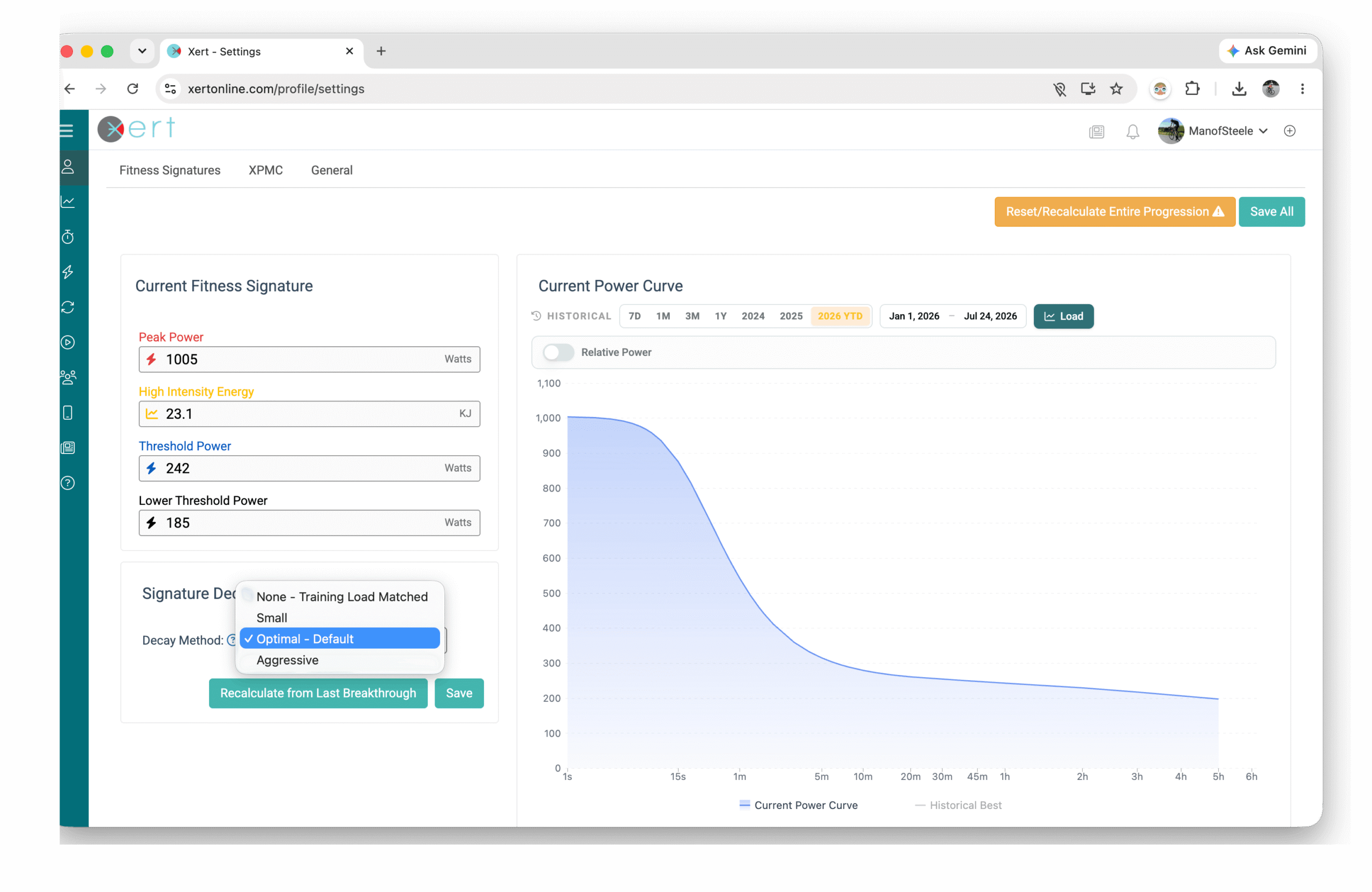
Changing Signature Decay
You can adjust your Signature Decay setting by navigating to: Profile Settings → Fitness Signatures → Signature Decay.
In most cases, it’s best to change your decay setting immediately after a Breakthrough and simply click Save. This will apply the new decay method moving forward without modifying your historical signatures.
If it’s been some time since your last Breakthrough and you’d like the new decay setting to be reflected in your recent fitness history, use Recalculate from Last Breakthrough. This will recalculate your Fitness Signature from your most recent Breakthrough onward using the newly selected decay method.
Common Misunderstandings (FAQ)
“I'm following the workouts but my FTP is declining”
Signature decay allows all aspects of your fitness signature (including FTP) to track with changes in their training loads. If your FTP is gradually decreasing, review your training load in your XPMC. If your training load is holding steady or gradually decreasing, then a stall or small drop in FTP is expected. Try increasing your Improvement Rate setting (if using XATA) or try increasing your Goal/Event target (if using XFAI).
“No Decay is always best.”
Not always. It can be great in steady training blocks, but it can also make Breakthroughs harder if your model creeps high from subtle data issues.
Key Takeaway
Signature Decay is about keeping your model realistic and your Breakthroughs meaningful. Use Optimal unless you have a clear reason to change—and remember: consistent training plus occasional hard efforts gives the cleanest, most confident signature tracking over time.
Comments
0 comments
Please sign in to leave a comment.